
The Solana ecosystem has really blossomed, even by 2026. What started as a faster alternative to Ethereum has become a hub for DeFi, NFTs, and innovative applications. With more people holding digital assets on Solana, and more complex interactions becoming commonplace, choosing the right wallet is more important than ever. It’s not just about securely storing your SOL; it’s about seamlessly interacting with this growing world.
This means considering factors beyond just basic functionality. Security is paramount, of course, but ease of use, feature sets, and even the overall user experience can significantly impact your Solana journey. A poorly chosen wallet can lead to frustration, lost funds, or missed opportunities. That's why understanding the differences between the leading options is so critical.
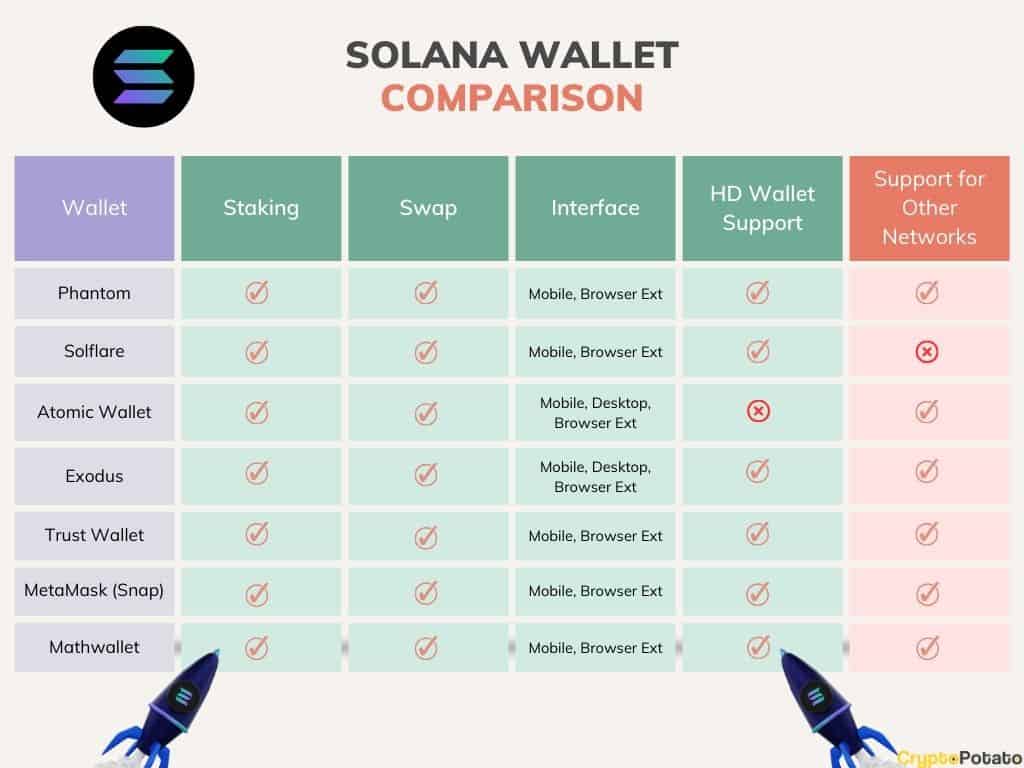
Currently, two wallets consistently rise to the top for beginners: Solflare and Phantom. Both are non-custodial, meaning you control your private keys, and both are widely respected within the Solana community. But they approach the wallet experience in different ways. I’ll walk through how they stack up, helping you decide which one is best for you.
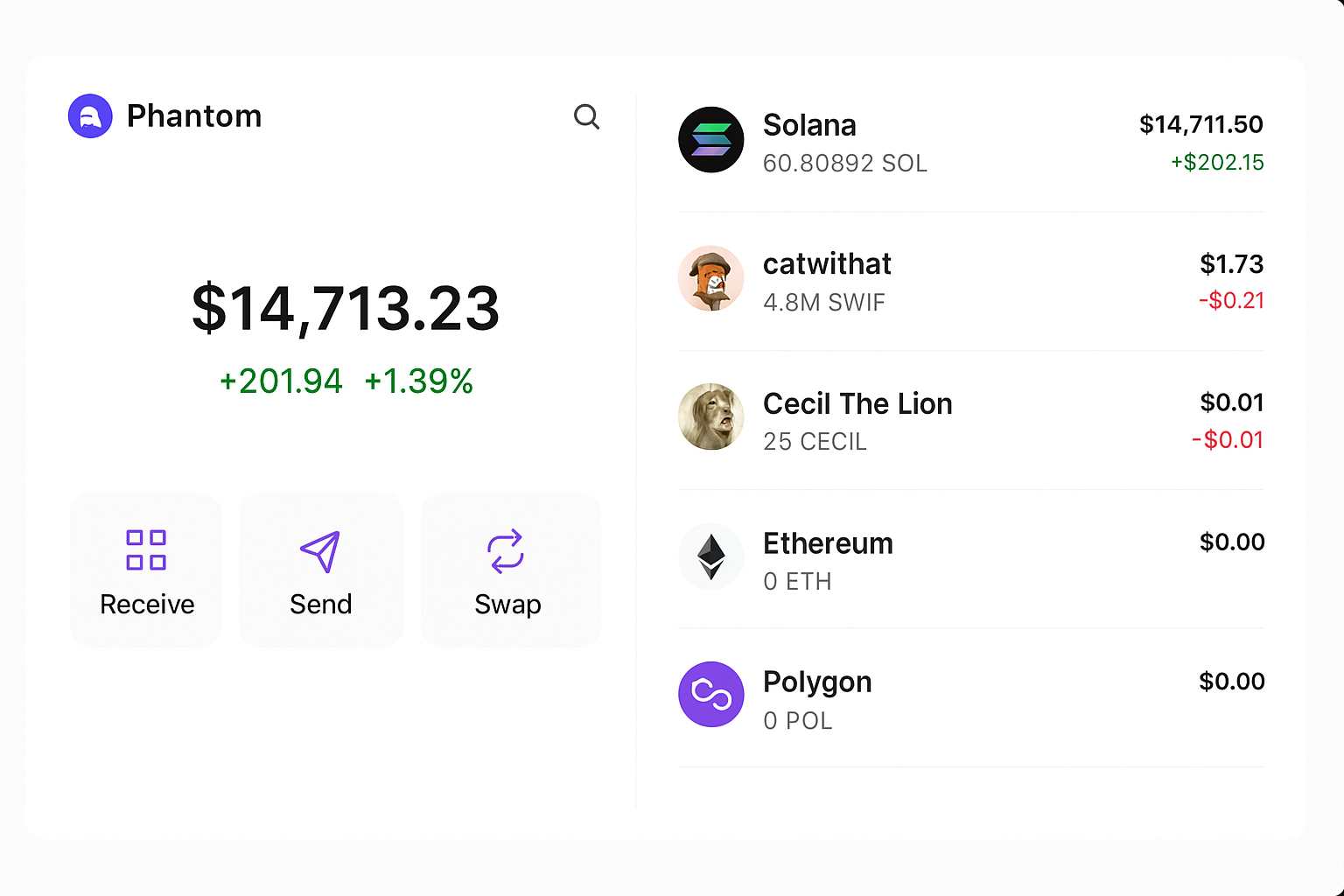
Solflare aims to be more than just a wallet; it positions itself as a complete Solana ecosystem gateway. The onboarding process is fairly straightforward, offering options for creating a new wallet or importing an existing one. It feels a little more involved than Phantom’s initial setup, asking more questions about security preferences upfront, but this could be a good thing for newcomers who want a guided experience.
Core features include sending and receiving SOL and SPL tokens, managing your NFT collection (with a dedicated NFT section), and built-in staking functionality. I found the token management to be particularly well-organized, making it easy to view your holdings and track performance. They've also introduced “Magic,” an on-chain AI assistant as of late 2026, which is an ambitious attempt to simplify complex interactions with smart contracts. It’s still early days, but the potential is there.
Solflare’s interface is comprehensive, perhaps even a bit overwhelming at first glance. There are a lot of options and features packed in. However, the layout is logical, and the team has clearly put effort into making it accessible. It feels like a professional-grade tool, designed for users who want a lot of control and functionality. It's not the simplest option, but it's incredibly powerful.
- Key Features: Wallet creation, token management, NFT support, staking, Magic AI Assistant.
- Onboarding: More detailed setup with security-focused options.
- Interface: Comprehensive and feature-rich, potentially overwhelming for absolute beginners.
Phantom has built a strong reputation for its speed and incredibly clean user interface. It’s often the first wallet recommended to new Solana users, and for good reason. The setup process is remarkably simple – you're up and running with a new wallet in a matter of seconds. It focuses on getting you into the ecosystem as quickly as possible.
Phantom’s core features cover the essentials: sending/receiving SOL and tokens, managing NFTs, and viewing your transaction history. It doesn’t try to do everything like Solflare. It prioritizes a streamlined experience, focusing on the most common tasks. This simplicity can be a major advantage for beginners who are easily intimidated by complex interfaces.
Where Phantom really shines is its NFT display. It presents your NFTs in a visually appealing and intuitive way, making it easy to browse and showcase your collection. The team has clearly invested a lot of effort into making the NFT experience as smooth and enjoyable as possible. It feels less like a purely functional wallet and more like a digital art gallery. While it lacks the Magic AI assistant, Phantom’s speed and ease of use are a strong selling point.
Security is non-negotiable when dealing with cryptocurrency. Both Solflare and Phantom are non-custodial, meaning you’re responsible for protecting your seed phrase. They both recommend using strong passwords and enabling two-factor authentication whenever possible. Both wallets have undergone security audits, though details on the scope and findings can be difficult to compare directly.
Solflare emphasizes its security features, including hardware wallet support for Ledger and Trezor. They’ve also implemented Shield, a transaction simulation feature designed to protect against malicious smart contracts. Phantom also supports hardware wallets, which is a significant plus. I wouldn’t trust any Solana wallet without hardware wallet compatibility.
However, it’s important to remember that no wallet is completely immune to security risks. Phishing attacks and malicious dApps remain a threat. Users need to be vigilant and practice good security hygiene, regardless of which wallet they choose. It's generally good practice to store your seed phrase offline, ideally in a secure location like a metal backup.
Both Solflare and Phantom allow you to connect to Solana’s thriving DeFi ecosystem and dApps. Phantom has a built-in dApp browser, making it incredibly easy to access popular platforms like Raydium, Orca, and Magic Eden. You can simply navigate to the dApp within Phantom and connect your wallet with a single click.
Solflare doesn't have a built-in dApp browser, so you'll need to use a third-party browser extension or navigate to the dApp directly in your web browser. Connecting your wallet is still relatively straightforward, but it adds an extra step. I found that the experience was generally seamless on both wallets, but Phantom’s integrated browser provides a slight convenience advantage.
Compatibility issues are rare, but they can occur. Some dApps may be optimized for one wallet over the other. If you encounter problems, try switching wallets or checking the dApp’s documentation. Overall, both wallets provide a good experience for interacting with Solana’s DeFi landscape.
Across Twitter, the general consensus seems to be that Phantom is the go-to for beginners, praised for its speed and simplicity. Many users report a smooth and intuitive experience, especially when it comes to NFT management. However, some users have expressed concerns about its limited features compared to Solflare.
Solflare users tend to be more experienced Solana enthusiasts who appreciate its comprehensive feature set and advanced options. They value the control and flexibility it provides, but acknowledge that it can be overwhelming for newcomers. There's a lot of discussion about the Magic AI assistant, with some users excited about its potential and others skeptical of its usefulness.
A recurring theme is the importance of hardware wallet support. Users consistently emphasize that the ability to connect a Ledger or Trezor is a critical security feature. Both wallets receive positive feedback in this regard, but users often mention that Phantom’s setup process for hardware wallets is slightly more straightforward.
Choosing between Phantom and Solflare ultimately depends on your individual needs and preferences. Phantom excels in simplicity and speed, making it an ideal choice for beginners who want a hassle-free experience. Its NFT display is top-notch, and its integrated dApp browser adds convenience.
Solflare, on the other hand, offers a more comprehensive feature set and greater control. It's better suited for experienced users who want to take full advantage of the Solana ecosystem. The Magic AI assistant is a unique offering that could be a game-changer, but it’s still too early to tell how effective it will be.
Here’s a quick comparison:
- Ease of Use: Phantom (easier), Solflare (more complex)
- Security: Both excellent, hardware wallet support crucial
- Features: Solflare (more comprehensive), Phantom (streamlined)
- DeFi Compatibility: Both good, Phantom has built-in dApp browser
- Community Support: Both have active communities
- Innovation: Solflare (Magic AI Assistant)
Solflare vs. Phantom: A Beginner's Comparison (2026)
| Criteria | Solflare | Phantom |
|---|---|---|
| Beginner Friendliness | Medium | High |
| Solflare's interface, while improved, still presents more options upfront which can be overwhelming for new users. It caters to a broader range of users, including those with some existing crypto experience. | Phantom is consistently praised for its clean, intuitive design. It guides new users through key actions with a simpler, more focused interface. | |
| Security Reputation | Good | Excellent |
| Solflare has a strong security track record and actively promotes its security features, including its open-source nature. However, it has faced some scrutiny in the past regarding potential vulnerabilities, which have been addressed. | Phantom has maintained a very strong reputation for security within the Solana community. It benefits from regular audits and a proactive approach to addressing potential threats. | |
| Feature Richness | Extensive | Moderate |
| Solflare offers a very wide array of features, including trading, staking, hardware wallet support, and its new Magic AI Assistant. This breadth can be both a benefit and a drawback for beginners. | Phantom focuses on core wallet functionality and a streamlined user experience. While it supports essential features, it generally offers fewer advanced options compared to Solflare. | |
| DeFi Integration | Good | Seamless |
| Solflare supports interaction with many DeFi protocols, but navigating these integrations can sometimes require more technical knowledge. | Phantom has built-in integrations with popular Solana DeFi platforms, making it easier for beginners to participate in activities like swapping tokens and providing liquidity. | |
| NFT Support | Good | Excellent |
| Solflare provides NFT viewing and management capabilities, but its NFT interface isn't as visually focused or feature-rich as Phantom's. | Phantom is well-known for its excellent NFT support, offering a visually appealing and user-friendly experience for browsing, displaying, and managing NFT collections. | |
| Speed & Responsiveness | Average | Fast |
| Users occasionally report slower transaction processing or interface responsiveness with Solflare, particularly during times of high network congestion. | Phantom is generally regarded as being very fast and responsive, even during periods of high network activity. |
Illustrative comparison based on the article research brief. Verify current pricing, limits, and product details in the official docs before relying on it.
Reddit conversations generally echo the sentiment on Twitter. Users frequently debate the trade-offs between Phantom’s simplicity and Solflare’s features. Many threads focus on the security aspects of each wallet, with users sharing tips and best practices. There’s a noticeable current of concern about seed phrase security and phishing scams.
One common point of discussion is the long-term scalability of each wallet. Some users wonder if Phantom’s minimalist approach will limit its ability to adapt to the evolving needs of the Solana ecosystem. Others believe that Solflare’s feature bloat could eventually lead to performance issues. It’s a debate that’s likely to continue as Solana matures.
No comments yet. Be the first to share your thoughts!