
Solana wallets in 2026
Solana is now a primary hub for apps and assets. You need a wallet that does more than just hold SOL. I look for tools that handle security without making every transaction a headache.
In early 2026, the Solana wallet space is characterized by rapid innovation. New features, enhanced security protocols, and a growing focus on user-friendliness are defining the current landscape. This guide provides a current comparison of leading Solana wallets, evaluating them based on the criteria most important to users in 2026.
Security is paramount. The potential for loss due to hacks or compromised private keys is a constant threat in the crypto world. We’ll explore the different security models employed by various wallets, as well as best practices for protecting your assets. This isn’t a static field; wallets are continuously updating their security measures, making consistent evaluation essential.
Custodial vs. non-custodial wallets
The first choice is between custodial and non-custodial wallets. Exchanges like Coinbase or Binance hold your keys in custodial setups. It is easier to reset a password there, but you don't actually own the coins if the exchange goes bust.
The primary benefit of a custodial wallet is ease of use. They often integrate seamlessly with trading platforms and other services. However, this convenience comes at the cost of trust – you are relying on a third party to secure your assets. If the exchange is hacked or faces regulatory issues, your funds could be at risk.
Non-custodial wallets, on the other hand, give you complete control. You are responsible for safeguarding your seed phrase, which is the key to accessing your wallet. This offers greater security but also greater responsibility. The mantra 'not your keys, not your coins' applies directly here. Losing your seed phrase means losing access to your funds—there’s no central authority to help you recover them.
The trade-off is clear: custodial wallets prioritize convenience, while non-custodial wallets prioritize security and control. The best choice depends on your individual needs and risk tolerance. For long-term storage and maximum security, a non-custodial wallet is generally recommended.
- Custodial wallets: A company holds your keys. It is easy to use but you lose control.
- Non-Custodial Wallets: You control private keys, maximum security, requires responsible seed phrase management.
The best Solana wallets right now
The Solana wallet ecosystem is diverse, with options catering to different user needs. We’ve evaluated numerous wallets based on security audits, feature sets, user experience, developer activity, and community feedback to compile this list. Rankings can shift quickly, but these wallets consistently perform well as of early 2026.
Phantom consistently ranks as a top choice. It's known for its sleek interface, integrated DeFi tools, and support for NFTs. Phantom offers a good balance between ease of use and advanced features, making it suitable for both beginners and experienced users. However, its popularity also makes it a more attractive target for phishing attempts.
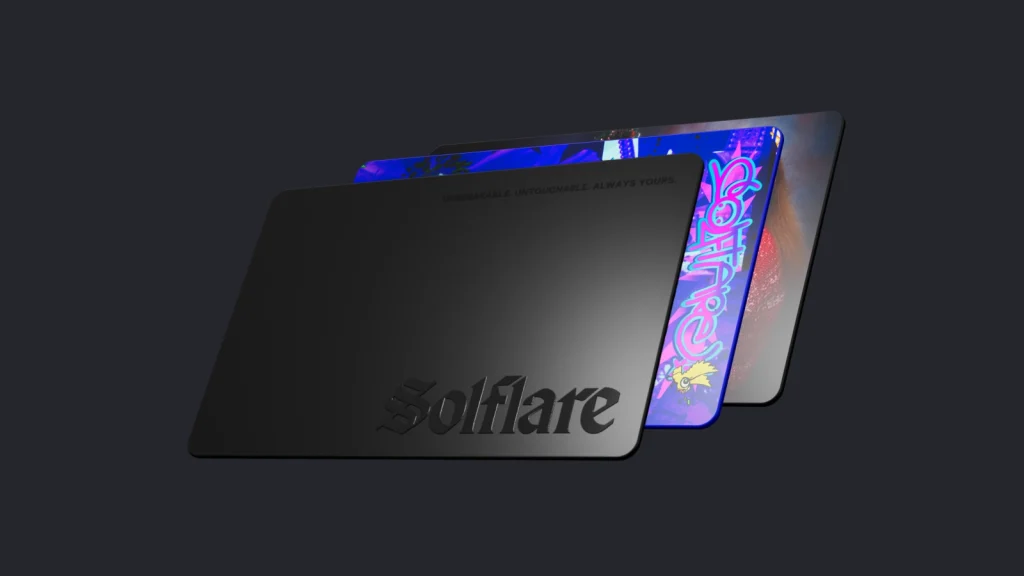
Solflare is another strong contender, particularly favored by power users. It provides advanced features like transaction simulation and hardware wallet integration. Solflare's focus on security and control appeals to those who prioritize self-custody. It’s often considered more complex than Phantom, but offers greater flexibility.
Backpack has gained significant traction, emphasizing a more secure and streamlined user experience. Backpack integrates with its own exchange and focuses on simplifying the Solana experience. Its relatively new status means it’s still evolving, but it’s quickly becoming a popular choice.
Raydium Wallet is directly integrated with the Raydium AMM, making it a convenient option for traders on that platform. It offers fast transaction speeds and low fees. However, its primary focus is on trading, so it may lack some of the broader features found in other wallets.
Orca Wallet is known for its user-friendly interface and integration with the Orca DEX. It's a good option for beginners looking for a simple and straightforward way to manage their Solana assets. Its limited feature set may not appeal to more advanced users.
Hedge Wallet offers a unique approach to security with its account abstraction features. It allows for more flexible transaction signing and recovery options. It’s a newer wallet, so it’s still building its community and feature set, but it represents an interesting direction for Solana wallets.
Sirius Wallet is a mobile-first wallet with a focus on simplicity and ease of use. It's a good option for users who primarily access Solana from their smartphones. It offers basic wallet functionality and support for common Solana dApps.
- Phantom
- Solflare
- Backpack
- Raydium Wallet
- Orca Wallet
- Hedge Wallet
- Sirius Wallet
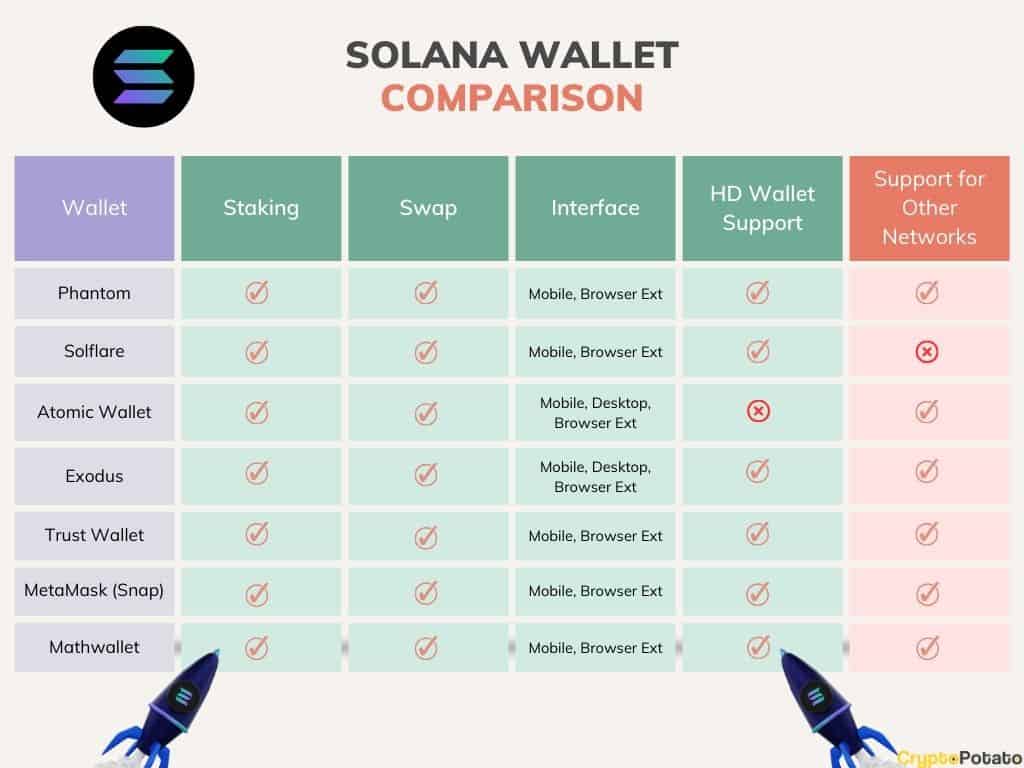
Solana Wallet Comparison - 2026
| Wallet Name | Custodial/Non-Custodial | Supported Features | Security Features | User Interface |
|---|---|---|---|---|
| Phantom | Non-Custodial | Staking, DeFi integration, NFT support | Biometric login (device dependent), Seed phrase backup | Beginner-friendly, visually appealing |
| Solflare | Non-Custodial | Staking, DeFi integration, NFT support, Token Swap | Password protection, Seed phrase backup | Advanced, feature-rich |
| Backpack | Non-Custodial | DeFi integration, NFT support, Transaction simulation | Multi-factor authentication options, Seed phrase backup | Intermediate - geared towards power users |
| Trust Wallet | Non-Custodial | Staking, DeFi integration, NFT support, Multi-chain support | Biometric login (device dependent), Seed phrase backup | Beginner-friendly, mobile-focused |
| Ledger Nano X | Non-Custodial (Hardware) | Solana support via iSol | Secure Element chip, PIN protection | Requires separate app, more complex setup |
| Coin98 Super App | Non-Custodial | Staking, DeFi integration, NFT support, Multi-chain support | Biometric authentication, Seed phrase backup | Intermediate, mobile-first |
Illustrative comparison based on the article research brief. Verify current pricing, limits, and product details in the official docs before relying on it.
How to keep your SOL safe
Securing your Solana wallet is the most important step in protecting your digital assets. A compromised wallet can lead to the irreversible loss of funds. Following these best practices can significantly reduce your risk.
Seed Phrase Management: Your seed phrase is the master key to your wallet. Never share it with anyone, and store it offline in a secure location. Consider using a metal seed phrase backup for added durability. Do not store it digitally, even encrypted.
Phishing Awareness: Be extremely cautious of phishing attempts. Scammers often create fake websites or emails that mimic legitimate Solana projects. Always double-check the URL and verify the sender’s identity before entering your seed phrase or private key.
Hardware Wallets: Using a hardware wallet adds an extra layer of security by storing your private keys offline. This makes it much more difficult for hackers to gain access to your funds. Ledger and Trezor are popular hardware wallet options.
Regularly Review Permissions: Regularly review the permissions granted to dApps connected to your wallet. Revoke access to any dApps you no longer use. Be cautious about connecting your wallet to unknown or untrusted applications.
- Write your seed phrase on paper or metal and hide it. Never save it in a notes app or email.
- Be wary of phishing attempts.
- Use a hardware wallet for enhanced security.
- Regularly review dApp permissions.
- Enable two-factor authentication where available.
Hardware Wallet Integration
Integrating a hardware wallet with your Solana wallet provides a significant boost to security. Hardware wallets store your private keys on a physical device, isolated from your computer and the internet. This makes it virtually impossible for hackers to steal your keys, even if your computer is compromised.
Ledger and Trezor are the two most popular hardware wallet brands. Both offer support for Solana, allowing you to securely manage your SOL and other Solana-based tokens. The setup process typically involves connecting the hardware wallet to your computer and installing the necessary software.
Once connected, you can use your Solana wallet (like Phantom or Solflare) to interact with the blockchain through the hardware wallet. Transactions are signed on the device, ensuring that your private keys never leave the secure environment. This provides peace of mind and reduces the risk of theft.
- Ledger Nano S Plus: A popular and affordable hardware wallet.
- Trezor Model T: A more advanced hardware wallet with a touchscreen display.
Emerging Wallet Trends & The Future
The Solana wallet landscape is constantly evolving. Several emerging trends are shaping the future of how users interact with the network. Account abstraction is gaining traction, allowing for more flexible transaction signing and recovery options. This could simplify the user experience and reduce the risk of losing access to funds.
Multi-sig wallets are also becoming more popular, particularly for institutional investors and teams managing large amounts of assets. These wallets require multiple approvals to authorize transactions, adding an extra layer of security. Mobile wallet improvements are another key focus, with developers striving to create more convenient and user-friendly mobile experiences.
We can expect to see continued innovation in wallet security, with features like biometric authentication and enhanced phishing protection becoming more commonplace. The integration of wallets with decentralized identity solutions is also a potential area of growth. Ultimately, the goal is to make Solana wallets more secure, accessible, and user-friendly for everyone.
Featured Products

Secure management of cryptocurrencies and NFTs · Hardware wallet functionality for enhanced security · Compatibility with Desktop and Android operating systems
This hardware wallet offers robust security and broad Solana compatibility, essential for safeguarding digital assets in the evolving DeFi and NFT landscape.
Secure management of cryptocurrencies and NFTs · Hardware wallet functionality for enhanced security · Compatibility with Desktop and Android operating systems
This hardware wallet offers robust security and broad Solana compatibility, essential for safeguarding digital assets in the evolving DeFi and NFT landscape.

Trezor Model T hardware wallet · Billfodl steel cold seed storage for backup · Comprehensive security for digital assets
This hardware wallet offers robust security and broad Solana compatibility, essential for safeguarding digital assets in the evolving DeFi and NFT landscape.

Includes Ledger Nano X and Ledger Nano S Plus · Supports Bluetooth and cable connectivity · Facilitates buying, swapping, staking, and managing digital assets
This hardware wallet offers robust security and broad Solana compatibility, essential for safeguarding digital assets in the evolving DeFi and NFT landscape.
Secure management of cryptocurrencies and NFTs · Hardware wallet functionality for enhanced security · Compatibility with Desktop and Android operating systems
This hardware wallet offers robust security and broad Solana compatibility, essential for safeguarding digital assets in the evolving DeFi and NFT landscape.
As an Amazon Associate I earn from qualifying purchases. Prices may vary.
No comments yet. Be the first to share your thoughts!