
Solana Wallets: A 2026 Snapshot
The Solana ecosystem has grown significantly, and with that growth comes a greater need for secure and user-friendly wallets. The number of active Solana wallets has continued to climb, making the choice of the right wallet more important than ever. Your wallet isn’t just a place to store your SOL and other tokens; it’s your gateway to the entire Solana world of DeFi, NFTs, and dApps.
Choosing the best Solana wallet depends on your individual needs and risk tolerance. Some prioritize maximum security, while others value ease of use and a feature-rich interface. Options range from simple browser extensions to dedicated hardware devices. Understanding the differences between these options is the first step to protecting your digital assets.
Solana wallets fall into a few key categories. Custodial wallets are managed by a third party, offering convenience but relinquishing control of your private keys. Non-custodial wallets put you in complete control, but also require you to be responsible for your own security. Hardware wallets are physical devices that offer the highest level of security by keeping your keys offline, and software wallets are applications that run on your computer or phone.
Top 7 Solana Wallets for 2026
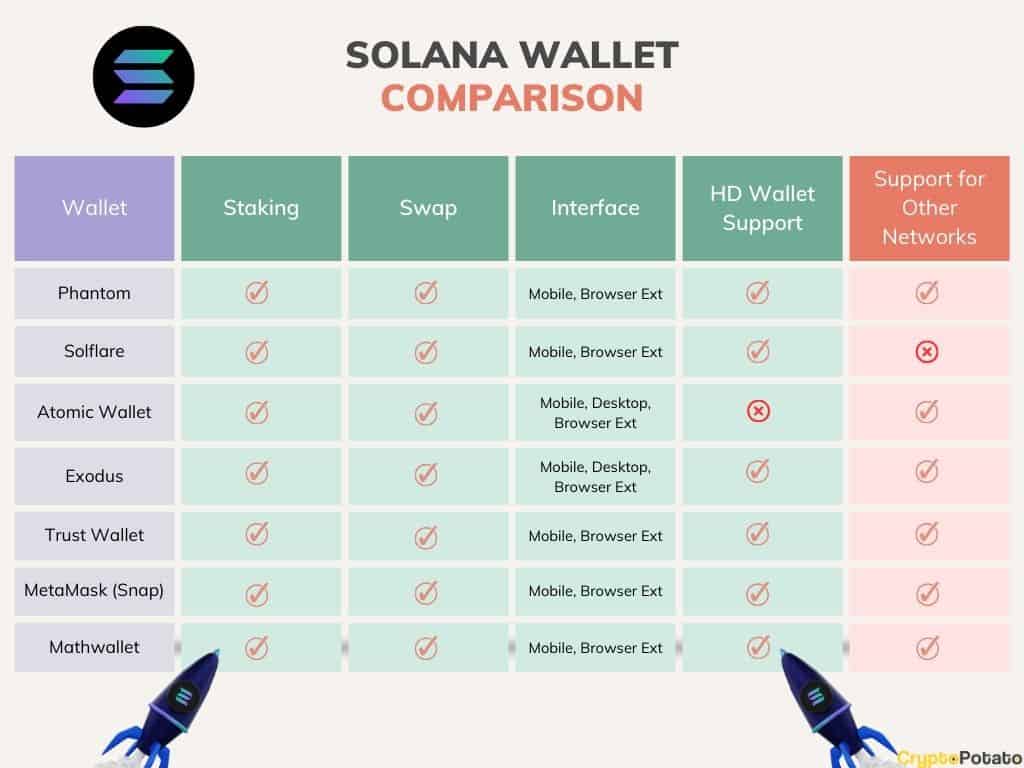
Picking the right wallet can feel overwhelming. Here’s a look at seven of the best Solana wallets, each with its own strengths and weaknesses. This isn’t about declaring a single "winner," but about finding the best fit for your needs.
Phantom remains a popular choice, praised for its sleek interface and ease of use. It supports sending and receiving SOL, SPL tokens, and NFTs, and offers a built-in swap feature. However, as a hot wallet, it’s more vulnerable to attacks than cold storage options. It's a browser extension, making it convenient but requiring vigilance against phishing attempts.
Solflare is another strong contender, offering both a web and mobile app. It’s known for its robust security features, including hardware wallet support and multi-signature transactions. It also provides detailed transaction history and portfolio tracking. Solflare's interface isn't quite as polished as Phantom's, but it makes up for it in functionality.
Backpack has emerged as a notable wallet, particularly for its focus on order book trading and advanced DeFi features. It offers a unique 'xTag' system for managing multiple Solana accounts and integrates directly with Backpack Exchange. This wallet is geared towards more experienced Solana users who want access to sophisticated trading tools.
Trust Wallet is a well-established multi-chain wallet that now supports Solana. It’s a good option if you hold assets on multiple blockchains, as it allows you to manage everything from a single app. However, its Solana support isn’t as comprehensive as dedicated Solana wallets.
Ledger Nano S Plus and Ledger Nano X are hardware wallets that provide the highest level of security. They store your private keys offline, protecting them from online threats. While they require a bit more setup and aren’t as convenient for frequent transactions, they’re ideal for long-term storage of significant holdings.
CoinLedger has a wallet function, but it's primarily known for its tax reporting tools. It's useful for tracking your Solana transactions and calculating your capital gains or losses. It's not the best choice as a primary wallet, but a very useful tool for tax season.
Tangem offers a unique approach with its card-based hardware wallet. It’s a physically secure device that doesn’t require batteries or Bluetooth, making it resistant to certain types of attacks. The Tangem wallet is a good option for users who want the security of a hardware wallet but prefer a more streamlined experience.
Featured Products

Securely manage crypto and NFTs · Compatible with desktop and Android · Matte Black finish
This hardware wallet provides a secure and accessible way to manage your Solana assets and NFTs.
Securely manage crypto and NFTs · Compatible with desktop and Android · Matte Black finish
This hardware wallet provides a secure and accessible way to manage your Solana assets and NFTs.
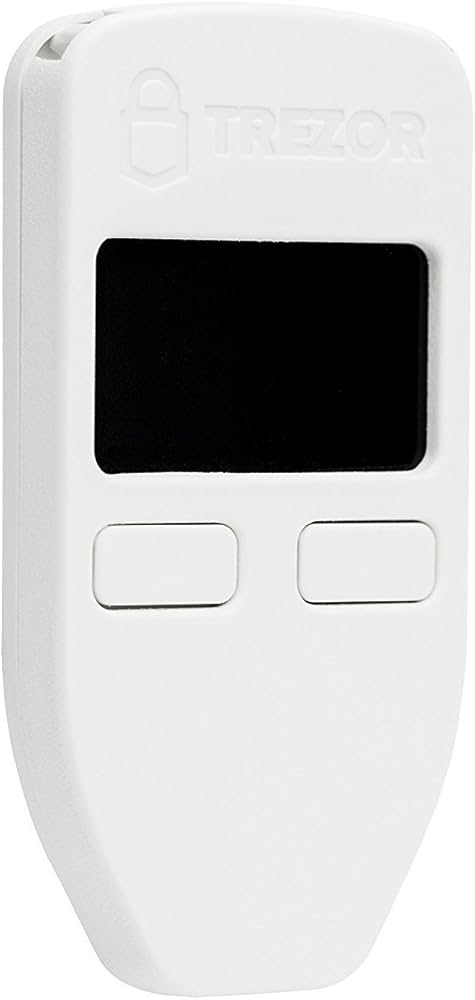
Touchscreen interface · Supports a wide range of cryptocurrencies · Robust security features
While direct Solana support may vary, the Trezor Model T is a highly trusted hardware wallet known for its strong security and user-friendly interface, making it a solid choice for managing various digital assets.

3-inch color LCD touchscreen · Supports NFTs, crypto currency, and tokens · All-in-one digital wallet solution
This hardware wallet offers a premium experience with its large touchscreen and comprehensive support for various digital assets, ensuring secure management of your Solana holdings.
As an Amazon Associate I earn from qualifying purchases. Prices may vary.
Security Deep Dive: What to Look For
Security should be your top priority when choosing a Solana wallet. A compromised wallet can lead to the loss of all your funds. Seed phrases, those 12 or 24-word backups, are critical. Treat them like cash – never share them with anyone, and store them offline in a secure location.
Multi-factor authentication (MFA) adds an extra layer of protection by requiring a second form of verification, such as a code from your phone. Browser extension security is important. Ensure you’re downloading extensions from official sources and regularly check for updates. Phishing attacks are a constant threat, so be wary of suspicious links and websites.
Understanding the difference between hot and cold storage is important. Hot wallets (like Phantom and Solflare) are connected to the internet, making them convenient but more vulnerable. Cold wallets (like Ledger and Tangem) store your keys offline, providing greater security. Regularly updating your wallet software is also vital, as updates often include security patches.
Beyond the wallet itself, practice good security habits. Use strong, unique passwords for all your accounts, and be cautious about clicking on links or downloading files from unknown sources. No wallet is foolproof, and your own vigilance is the best defense against attacks.
- Securely store your seed phrase offline.
- Enable multi-factor authentication.
- Download extensions from official sources.
- Be wary of phishing attempts.
- Keep your wallet software updated.
Custodial vs. Non-Custodial: Your Keys, Your Control
The fundamental difference between custodial and non-custodial wallets lies in who controls your private keys. Custodial wallets, like those offered by some exchanges, hold your keys for you. This is convenient, as you don’t have to worry about managing them yourself, but it also means you don’t have complete control over your funds. You’re trusting a third party to keep your assets safe.
With non-custodial wallets, you are solely responsible for your keys. This gives you complete control, but also comes with increased responsibility. If you lose your seed phrase, you lose access to your funds. There’s no central authority to help you recover it. Secure seed phrase management is important.
Custodial wallets are generally easier to use, making them a good option for beginners. However, they also carry the risk of the custodian being hacked or going out of business. Non-custodial wallets are better suited for experienced users who understand the risks and are comfortable managing their own keys.
Choosing between custodial and non-custodial depends on your individual needs and risk tolerance. If you prioritize convenience and are willing to trust a third party, a custodial wallet may be a good choice. If you prioritize control and security, a non-custodial wallet is the way to go.
Custodial vs. Non-Custodial Solana Wallets: A Comparison
| Control of Funds | Security Responsibility | Ease of Use | Recovery Options | Trust Required |
|---|---|---|---|---|
| Limited | Provider | High | Provider-managed, potentially involving KYC | High |
| Full | User | Medium | Seed phrase/private key based, requiring secure storage | Low |
| Provider holds keys | Provider | High | Typically email/password recovery, subject to provider policies | High |
| User holds keys | User | Medium | Seed phrase is the primary recovery method | Low |
| Funds accessible via provider platform | Provider | High | Account recovery processes determined by the provider | High |
| Funds accessible via user's device/browser extension | User | Medium | Reliance on secure seed phrase management | Low |
Illustrative comparison based on the article research brief. Verify current pricing, limits, and product details in the official docs before relying on it.
Beyond the Basics: Advanced Wallet Features
Many Solana wallets offer features beyond basic sending and receiving. Staking integration allows you to earn rewards by participating in the Solana network. NFT support is essential for managing your digital collectibles. Built-in swap functionality lets you easily exchange one token for another.
Portfolio tracking provides a convenient overview of your holdings. Hardware wallet compatibility adds an extra layer of security. Some wallets also support multiple Solana networks, allowing you to interact with different dApps and ecosystems. Backpack, for example, excels in providing order book trading functionality.
These advanced features can significantly enhance your user experience and open up new possibilities within the Solana ecosystem. When choosing a wallet, consider which features are most important to you. Do you plan to stake your SOL? Are you an avid NFT collector? Do you need advanced trading tools?
Wallets like Phantom and Solflare have integrated swap features, making it easy to exchange tokens directly within the wallet interface. This eliminates the need to use a separate exchange, saving you time and fees. These features aren’t essential for everyone, but they can be incredibly useful for active Solana users.
Wallet Standouts: Backpack & Phantom
Backpack and Phantom consistently rank among the top Solana wallets, but they cater to different types of users. Phantom is known for its user-friendliness and clean interface, making it an excellent choice for beginners. It's simple to set up and navigate, and it supports a wide range of Solana tokens and NFTs.
Backpack, on the other hand, is geared towards more experienced traders and DeFi users. Its advanced features, such as order book integration and xTag account management, provide greater flexibility and control. Backpack’s focus on trading makes it a powerful tool for active Solana participants.
Phantom excels at providing a smooth and intuitive experience for everyday Solana transactions. It's ideal for users who want a simple and secure way to store and manage their assets. Backpack shines when it comes to advanced trading and DeFi strategies. It’s the wallet of choice for those who want to take full advantage of the Solana ecosystem’s capabilities.
Ultimately, the best wallet for you depends on your individual needs and preferences. If you’re new to Solana, Phantom is a great place to start. If you’re an experienced trader or DeFi enthusiast, Backpack is worth considering.
Troubleshooting Common Wallet Issues
Even with the best security measures, you may encounter issues with your Solana wallet. Losing your seed phrase is a serious problem. Without it, you cannot recover your funds. Always store your seed phrase offline in a secure location, and never share it with anyone. Transaction failures can occur due to network congestion or insufficient SOL for transaction fees.
Browser extension conflicts can also cause problems. Try disabling other browser extensions to see if that resolves the issue. Phishing scams are a constant threat. Be wary of suspicious links and websites, and always double-check the URL before entering your seed phrase or other sensitive information.
If you encounter an issue you can’t resolve yourself, contact the wallet’s support team. Most wallets have detailed documentation and support resources available on their websites. Phantom’s support documentation is available Solflare’s support can be found here:
Remember, staying informed and practicing good security habits are the best ways to protect your Solana assets. If something seems too good to be true, it probably is. Don't hesitate to seek help if you're unsure about something.
No comments yet. Be the first to share your thoughts!