
Choosing a Solana Wallet Within Your Budget
Selecting a Solana wallet is less about finding the "best" option and more about matching your specific security needs with your budget. The market offers a wide range of tools, from free software-based solutions to paid hardware devices, each with distinct tradeoffs in cost, age, and condition.
For most users, a free software wallet like Phantom or Solflare provides a solid entry point. These are ideal for daily use and interacting with decentralized applications (dApps). However, they store your private keys on your device, which makes them more vulnerable to malware or phishing attacks compared to hardware options. If you are holding significant amounts of SOL, the convenience of free software comes with a higher risk profile.
Hardware wallets offer a more secure alternative by keeping your private keys offline. Devices like Tangem allow you to stake Solana natively while maintaining full self-custody, meaning your SOL never leaves your device. This setup provides a decent APY without exposing your assets to external platform risks. While these devices require an upfront investment, they are generally more affordable than traditional cold storage solutions, making them a practical choice for those prioritizing security without breaking the bank.
When evaluating wallets, consider the age and condition of the device, especially if buying second-hand. Older hardware may have degraded components or outdated firmware, which can compromise security. Always purchase from official sources to ensure the device is in optimal condition. For a quick comparison of features and price points, refer to the table below.
| Wallet | Type | Cost | Best For |
|---|---|---|---|
| Phantom | Software | Free | Daily dApp use |
| Solflare | Software | Free | Daily dApp use |
| Tangem | Hardware | ~$59 | Staking & security |
Shortlist real options
Choosing a Solana wallet depends on whether you prioritize daily usability or maximum security. The ecosystem offers distinct tiers: software wallets for active trading and staking, and hardware solutions for long-term storage. Phantom and Solflare dominate the software category due to their integration with Solana’s decentralized applications (dApps). For users holding significant assets, Tangem provides a secure hardware alternative that supports native staking.
Phantom Wallet
Phantom is the most widely adopted Solana wallet, serving over 15 million users. It offers a clean interface for swapping tokens, bridging assets, and interacting with NFTs. Its deep integration with Solana dApps makes it the default choice for daily DeFi activity. However, as a hot wallet, it remains connected to the internet, which introduces higher exposure to phishing or malware compared to offline storage.
Solflare
Solflare is a mature alternative that emphasizes security features and multi-wallet support. It allows users to manage multiple accounts within a single interface and offers robust staking tools. Solflare is particularly favored by users who want granular control over their transaction settings. Like Phantom, it is a hot wallet, making it suitable for regular transactions but requiring careful security hygiene.
Tangem Wallet
Tangem is a hardware wallet that functions like a credit card, offering cold storage security without complex seed phrase management. It is one of the few hardware solutions that allow native Solana staking, enabling users to earn yield while keeping assets offline. This setup eliminates platform risk since the private keys never leave the device. It is ideal for long-term holders who want security without sacrificing yield.
| Wallet | Type | Native Staking | Best For |
|---|---|---|---|
| Phantom | Software (Hot) | Yes | Daily dApp use |
| Solflare | Software (Hot) | Yes | Multi-account management |
| Tangem | Hardware (Cold) | Yes | Long-term security |
Inspect the expensive parts
Solana’s high throughput and low fees are its greatest strengths, but they also create specific failure points that can cost you everything if overlooked. Unlike slower chains where a bad transaction might just sit in a pending queue, Solana processes blocks so quickly that errors compound instantly. You need a practical inspection checklist to verify that your wallet, dApp connections, and staking methods are actually secure before you move significant capital.
This guide walks you through the critical inspection steps for wallets and DeFi interactions on Solana. We focus on the "expensive" failures: drained accounts, phishing approvals, and lost staking rewards. Use this checklist to audit your setup before you fund it.

Most self-custody wallets like Phantom or Solflare offer basic seed phrase recovery, but for larger holdings, multisig is non-negotiable. Inspect your wallet’s advanced settings to ensure you have a multisig configuration (like Squads) that requires multiple signatures for large transfers. If you are using a hardware wallet, verify that it supports Solana’s specific signature formats (Ed25519) and that your firmware is up to date. A single compromised key in a non-multisig setup is an expensive failure point.
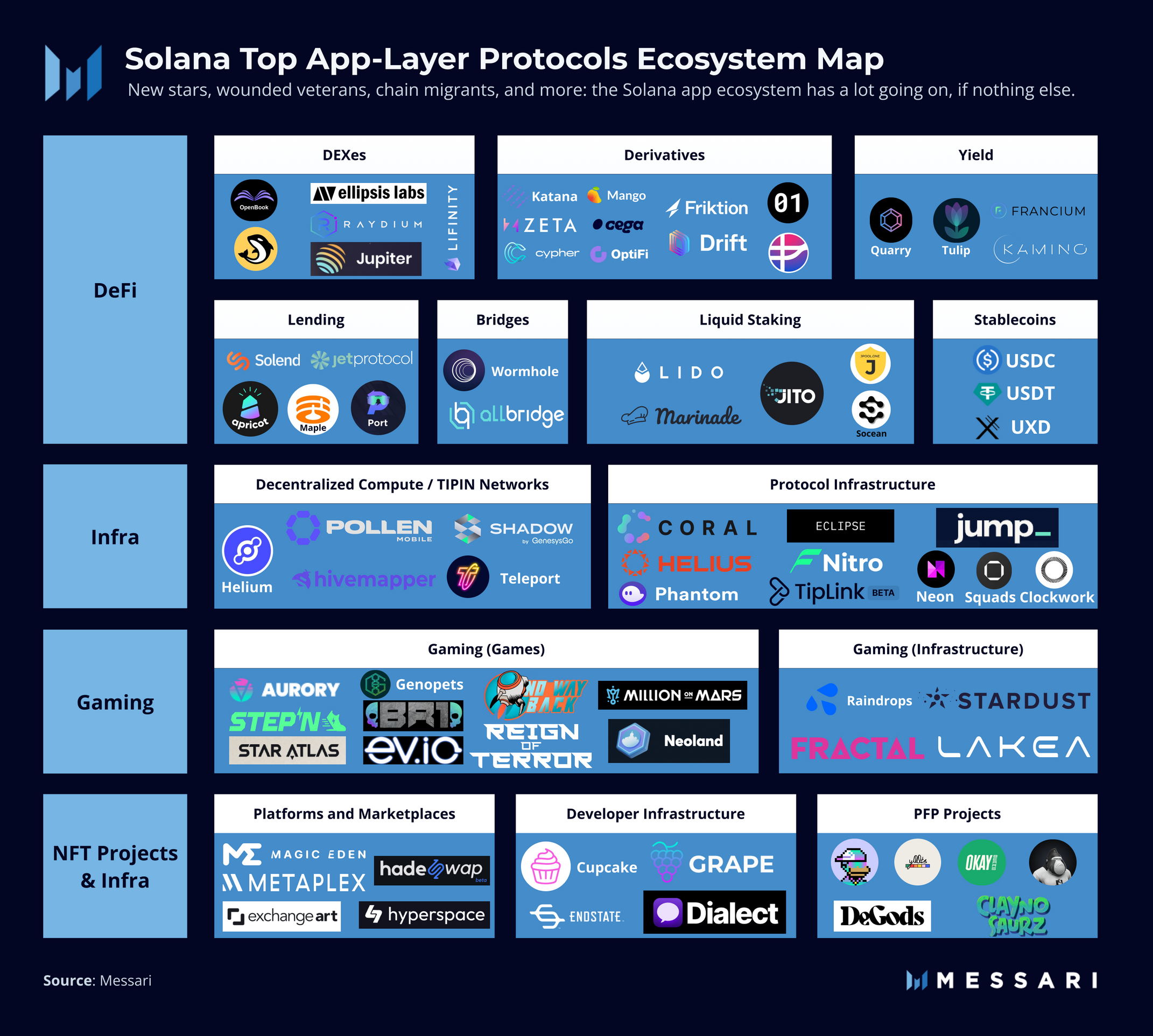
Solana’s ease of use often leads to users approving unlimited spending allowances for dApps they barely trust. Before interacting with any new platform, go into your wallet’s "Connected Sites" or "Permissions" menu. Revoke any old or unknown approvals. Inspect the specific token allowances: a malicious dApp might only need permission to swap one specific token, not your entire balance. Limiting permissions to specific tokens rather than "all tokens" is a critical safety layer.
Staking SOL is a primary way to earn yield, but it introduces counterparty risk if you delegate to a malicious or poorly secured validator. Always inspect the validator’s identity and security history. Use official Solana explorers or reputable staking dashboards to verify that the validator you are delegating to has not been slashed or flagged for downtime. If you are using a cold wallet like Tangem, ensure you are staking natively through the wallet interface to maintain self-custody, rather than sending SOL to an external exchange or platform.
Before moving your full balance, always perform a test transaction. Send a minimal amount of SOL to the destination wallet or interact with the dApp using a small sum. Verify that the transaction confirms correctly and that the funds arrive as expected. This step catches common errors like incorrect address formats (Solana addresses are base58 encoded and case-sensitive) or mismatched network tokens (e.g., sending SOL to an Ethereum-based address). It is the cheapest insurance policy you can buy.
Plan for ownership costs
The sticker price of a wallet is rarely the only expense. While software wallets like Phantom or Solflare are free to download, the true cost of ownership lies in the hardware required to keep your Solana safe and the operational fees that accumulate over time.
Hardware wallets represent the most significant upfront investment. Devices like Tangem or Ledger require an initial purchase ranging from $50 to $150. This cost buys you physical isolation from online threats, which is essential if you are holding substantial SOL. Without this hardware, you are relying entirely on the security of your computer or phone, which introduces risks like malware or phishing that software alone cannot mitigate.
Beyond the device, you must account for network fees. Every transaction on Solana, from swapping tokens to minting an NFT, requires a small amount of SOL for gas. While Solana is known for low fees, active users can still spend dozens of dollars annually in transaction costs. Additionally, some hardware wallets charge fees for staking rewards or require you to hold a small amount of SOL in the wallet to pay for future transactions, effectively locking up capital that could otherwise be earning yield.
A cheap buy stops being cheap when the cost of security failure exceeds the price of the device. If you lose access to your funds due to a compromised software wallet, the "savings" from not buying a hardware wallet are instantly erased. For most serious holders, the hardware cost is an insurance premium, not an optional accessory.


As an Amazon Associate, we may earn from qualifying purchases.
Solana Wallet FAQs
Choosing the right Solana wallet depends on how you plan to use your assets. The following questions address the most common concerns for new and experienced users.
Where should I keep my Solana?
If security is your top priority, a cold wallet is the safest route. For those who want to stake Solana natively while keeping full self-custody, hardware wallets like Tangem allow you to earn APY without exposing your keys to online platforms. Your SOL never leaves your device, eliminating exchange risk.
Is Phantom Wallet safe for Solana?
Phantom is one of the most widely used Solana wallets, serving over 15 million users. It is generally considered safe for daily transactions and dApp interactions due to its robust security features and regular updates. However, as with any software wallet, ensure you download it from the official source and never share your seed phrase.
What is the difference between hot and cold wallets?
Hot wallets, like Phantom or Solflare, are connected to the internet and offer convenience for frequent trading and NFT management. Cold wallets, such as Ledger or Tangem, are offline devices that provide superior protection against hacking. Use a hot wallet for daily spending and a cold wallet for long-term holdings.
Can I use multiple Solana wallets?
Yes, you can use multiple wallets simultaneously. Many users maintain a hot wallet for everyday transactions and a cold wallet for long-term storage. This separation limits your exposure to potential security breaches while allowing you to access your funds when needed.
No comments yet. Be the first to share your thoughts!