
Solana Wallets: What You Need to Know
A Solana wallet is your access point to the Solana ecosystem. It lets you interact with decentralized applications (dApps) and manage your digital assets, from trading on exchanges to buying NFTs. It holds the cryptographic keys proving your ownership of SOL and other tokens.
Wallets are either custodial or non-custodial. Custodial wallets are managed by a third party, like a bank, holding your private keys for convenience but limiting your control. Non-custodial wallets give you full control; you own your keys and are responsible for their safety.
Non-custodial wallets rely on a seed phrase, usually 12 or 24 words, which acts as the master key for recovery if you lose device access. Treat your seed phrase like cash: never share it and store it securely offline. Transaction signing uses your private key to authorize blockchain activity. You'll sign every transaction when sending SOL or interacting with a dApp.
Newcomers should understand these concepts. Losing your seed phrase means losing funds, as there's no customer support. The decentralized Solana blockchain has no central authority to reverse transactions or recover keys. You are responsible for protecting your wallet and seed phrase to navigate the Solana world safely.
Top 7 Solana Wallets of 2026
The Solana wallet space evolves quickly with new features and security updates. Here are seven top Solana wallets, ranked by security, features, and user experience.
1. Phantom: Phantom is a top choice with a sleek, intuitive interface ideal for beginners. It supports staking, DeFi integrations (Raydium, Orca), and NFT management, plus hardware wallets like Ledger and Trezor for added security. Occasional network congestion can impact transaction speeds, but this is a Solana network issue, not specific to Phantom.
2. Solflare: Solflare appeals to experienced users with its powerful features, including advanced transaction customization and multi-network support. It prioritizes security with hardware wallet compatibility and open-source code. Its interface is more complex than Phantom's, making it less beginner-friendly.
3. Backpack: Backpack is gaining traction for its unique security approach and integrated exchange, allowing direct trading within the wallet to reduce slippage and front-running risks. Its interface is clean and modern, though it's newer than Phantom and Solflare. It's popular with users interested in MEV opportunities.
4. Trust Wallet: Trust Wallet, a multi-chain option, supports Solana and many other blockchains, convenient for users with assets across ecosystems. However, its Solana features are less extensive than dedicated wallets like Phantom or Solflare. It's a good general wallet, but not ideal if you focus solely on Solana.
5. Ledger Nano X/S Plus (Hardware Wallet): Ledger devices offer top security by storing private keys offline, drastically reducing online attack risks. Connecting Ledger to Solana apps requires a browser extension. The Nano X has Bluetooth for convenience, while the Nano S Plus is more affordable. The main downsides are cost and less convenient access than software wallets.
6. Trezor Model T/One (Hardware Wallet): Trezor offers hardware wallet solutions for securing Solana assets, known for open-source firmware and strong security. The Model T has a touchscreen, while the Model One is a basic, budget-friendly option. Trezor wallets also require a browser extension for Solana interaction.
7. Sollet: Sollet, a web-based wallet from the Solana Foundation, is good for quick transactions and exploring the ecosystem. However, its browser-based nature makes it less suitable for long-term storage. It's a solid choice for testing or small SOL amounts, but less secure than dedicated wallets.
Featured Products

Secure crypto and NFT management · Works with desktop and Android · Matte Black finish
This hardware wallet offers a high level of security for storing your Solana assets, protecting you from online threats and giving you full control over your private keys.

Protective silicone material · Cutouts for USB-C and Micro SD · Designed for Trezor Model T
This hardware wallet accessory offers enhanced protection for your Solana assets, safeguarding your device from physical damage while maintaining accessibility.

3-inch color LCD touchscreen · Secure storage for NFTs, crypto, and tokens · All-in-one digital wallet solution
This hardware wallet offers a high level of security for storing your Solana assets, protecting you from online threats and giving you full control over your private keys.

Biometric fingerprint authentication · Secure Bluetooth storage · Supports a wide range of cryptocurrencies including Solana
This hardware wallet offers a high level of security for storing your Solana assets, protecting you from online threats and giving you full control over your private keys.
As an Amazon Associate I earn from qualifying purchases. Prices may vary.
Security Deep Dive: Protecting Your SOL
The Solana ecosystem is a target for scammers. Protecting your SOL requires vigilance and understanding common threats. Phishing attacks are rampant; beware of requests for your seed phrase or private key via email, messages, or websites. Never enter your seed phrase on any website other than your trusted wallet application.
Fake websites mimicking legitimate Solana projects or wallets are common. Always double-check URLs before entering information. Malicious browser extensions can compromise your wallet; only install extensions from trusted sources and review them regularly. Always verify transaction details—recipient address and amount—before signing. Scammers try to trick you into sending funds to the wrong address.
Use a strong, unique password for your wallet and enable two-factor authentication (2FA) where available for an extra layer of protection. 2FA requires a code from your phone or authenticator app. Hardware wallets are the gold standard for seed phrase storage, keeping keys offline and safe from online attacks.
If you write down your seed phrase, consider a metal backup, which is resistant to fire, water, and corrosion for long-term security. Avoid storing your seed phrase digitally on computers, phones, or in the cloud, as these are vulnerable to hacking.
- Verify URLs: Double-check website addresses before entering any information.
- Beware of phishing: Never share your seed phrase or private key.
- Use strong passwords: And enable two-factor authentication.
- Review transactions: Carefully confirm recipient address and amount.
- Secure your seed phrase: Use a hardware wallet or metal backup.
Phantom vs. Solflare: A Head-to-Head
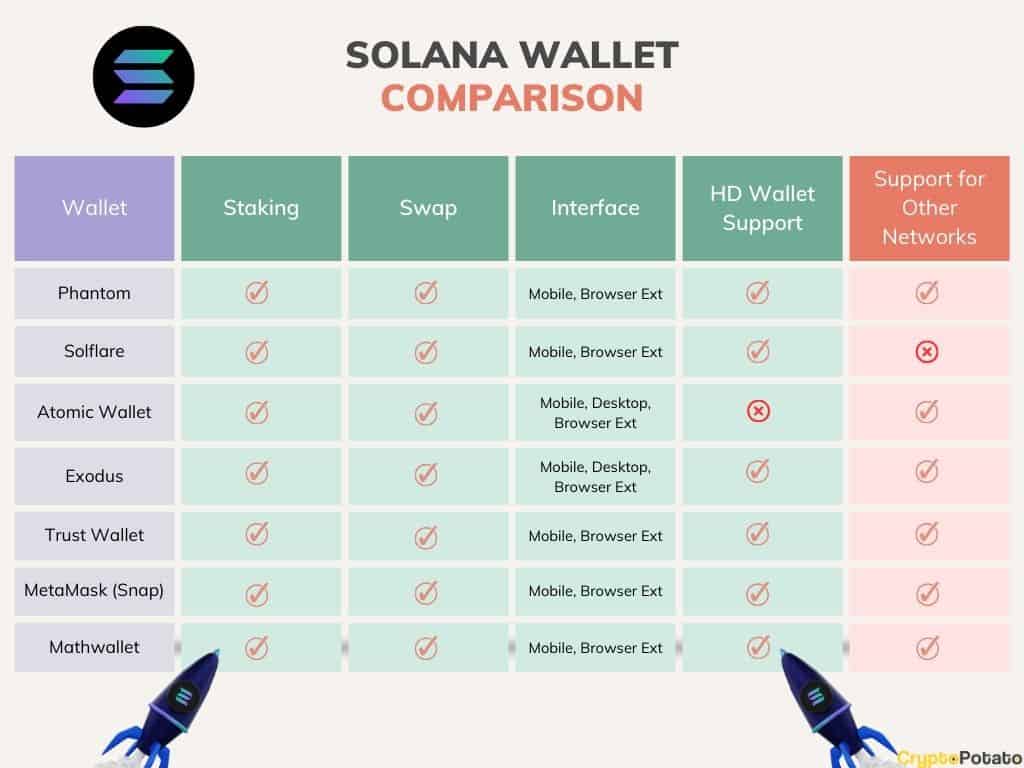
Phantom and Solflare are the two main Solana wallets, catering to different users. Phantom prioritizes simplicity and ease of use, ideal for beginners with its clean, intuitive, and visually appealing interface. Solflare offers more advanced features and customization for experienced users and traders.
undefined wallets support staking, DeFi integrations, and NFT management. However, Solflare offers more granular control over transaction fees and supports multiple Solana networks. Phantom’s built-in swap functionality is very convenient for quick token exchanges. UI-wise, Phantom excels with its polished design and seamless user experience. Solflare’s interface can feel a bit cluttered at times, but it provides more information at a glance.
Performance-wise, both wallets are generally responsive, but Phantom sometimes experiences slight delays during periods of high network congestion. Solflare's transaction processing can be a little faster in those situations. For new Solana users, Phantom is the easier entry point. For power users who want maximum control and customization, Solflare is the better choice.
Hardware Wallets and Solana: The Highest Security
Hardware wallets provide the most robust security for your Solana assets. Unlike software wallets, hardware wallets store your private keys offline, making them virtually immune to online attacks. When you initiate a transaction, your hardware wallet signs it offline, and the signed transaction is then sent to the blockchain.
Connecting a hardware wallet to a Solana application typically involves installing a browser extension provided by the wallet manufacturer (Ledger or Trezor). The extension acts as a bridge between your browser and your hardware wallet. The process is relatively straightforward, but it requires following the instructions carefully. The cost of a hardware wallet ranges from around $60 to $200, depending on the model and features.
While hardware wallets offer superior security, they are less convenient than software wallets. You need to physically connect the device to your computer or phone to sign transactions. This adds an extra step to the process, but it’s a small price to pay for peace of mind.
- Install the browser extension provided by your hardware wallet manufacturer.
- Connect your hardware wallet to your computer.
- Follow the on-screen instructions to pair the wallet with the extension.
- Verify the transaction details on your hardware wallet’s screen.
- Approve the transaction by pressing the buttons on your hardware wallet.
DeFi and NFT Support: Wallet Compatibility
Seamless integration with Solana’s thriving DeFi and NFT ecosystems is essential for many users. Phantom and Solflare both excel in this area, offering native support for popular protocols and marketplaces. Phantom provides easy access to Raydium, Orca, and Marinade Finance, allowing you to swap tokens, provide liquidity, and earn yield directly within the wallet.
Solflare also supports these protocols, but its integration is slightly less streamlined. Both wallets allow you to easily view and manage your NFTs on marketplaces like Magic Eden and Tensor. Backpack stands out with its integrated exchange, simplifying the process of trading NFTs and other tokens. Trust Wallet’s DeFi and NFT support is more limited compared to dedicated Solana wallets.
Ledger and Trezor, being hardware wallets, rely on browser extensions and dApp integration for DeFi and NFT interactions. This adds an extra layer of complexity but maintains the highest level of security. Some users have reported occasional issues with specific dApps not fully supporting hardware wallet integration, but these issues are generally resolved quickly.
Solana Wallet Comparison: DeFi/NFT Compatibility & Ease of Use (2026)
| Wallet Name | DeFi Integration | NFT Support | Ease of Use |
|---|---|---|---|
| Phantom | Excellent | Excellent | High |
| Solflare | Good | Excellent | Medium |
| Backpack | Good | Excellent | Medium |
| Trust Wallet | Fair | Good | Medium |
| Ledger Nano X | Fair | Good | Low |
| Coin98 Super Wallet | Good | Fair | Medium |
Illustrative comparison based on the article research brief. Verify current pricing, limits, and product details in the official docs before relying on it.
Future Trends in Solana Wallets
The Solana wallet landscape is constantly evolving. Account abstraction is a promising trend that could simplify wallet management and improve security. Account abstraction allows users to replace traditional private key management with more flexible and secure methods, such as social recovery and multi-factor authentication. Multi-party computation (MPC) is another emerging technology that could enhance wallet security by distributing private key control among multiple parties.
Improved security features, such as biometric authentication and hardware security modules (HSMs), are also likely to become more common in Solana wallets. We might also see wallets incorporating more advanced DeFi features, such as automated yield farming and portfolio rebalancing. Emerging wallet projects like Squad are experimenting with new approaches to wallet security and user experience.
The development of more user-friendly and accessible wallets is crucial for driving wider adoption of the Solana ecosystem. Wallets that can seamlessly integrate with other Web3 applications and offer a smooth onboarding experience will be well-positioned for success. Keep an eye on projects pushing the boundaries of wallet technology and prioritizing user security and convenience.
No comments yet. Be the first to share your thoughts!