
How we picked the best Solana wallets
Choosing the right Solana wallet means balancing security with the ability to actually use your assets. We evaluated the top contenders by looking at three concrete factors: security audits, user base size, and DeFi integration.
Security comes first. We prioritized wallets with transparent security records and active development teams that respond quickly to vulnerabilities. For Solana, this means checking if the wallet supports hardware integration and has a clear track record of protecting private keys.
Next, we looked at the ecosystem. A wallet is only as good as the apps it connects to. We tested each option against major Solana DeFi platforms and NFT marketplaces to ensure smooth transactions. If a wallet struggles with basic swaps or staking, it doesn't make the cut.
Finally, we considered the community. Large, active user bases often indicate a more stable and well-supported product. We relied on official sources like Solana.com and direct wallet provider documentation to verify claims about features and security protocols, avoiding third-party speculation.
Phantom Wallet: Best for everyday DeFi
Phantom has evolved from a simple Solana token holder into the default gateway for the entire Solana ecosystem. With over 15 million users, it remains the most recognized name in Solana wallets, largely because it removes the friction typically associated with blockchain interactions. The interface is clean and intuitive, making it an ideal starting point for newcomers while still offering the depth required by experienced traders.
The wallet’s native integration with Solana’s high-speed network is its strongest feature. Transactions that might lag on other chains confirm almost instantly on Phantom, which is critical when navigating volatile DeFi protocols or minting popular NFTs. This speed is complemented by a unified dashboard that aggregates your SOL balance, token holdings, and NFT collection in one view, so you don’t have to jump between different apps to check your status.
For everyday DeFi use, Phantom’s built-in swap aggregator is a significant time-saver. Instead of manually searching for the best liquidity pool across different decentralized exchanges, Phantom routes your trades through the most efficient paths automatically. This feature, combined with its robust support for dApp connections, means you can interact with lending platforms, staking services, and marketplaces with a single click. The wallet handles the complex backend logic, presenting you with a clear confirmation screen before you sign any transaction.
Solflare: Best for advanced trading features
Solflare stands out as the go-to wallet for users who want more than just basic storage. It is designed for those who actively engage with the Solana ecosystem, offering a suite of tools that simplify complex DeFi interactions. If you are looking to stake tokens, swap assets across chains, or manage a diverse portfolio, Solflare provides the infrastructure to do it efficiently.
The wallet’s interface is built around power-user needs. You get direct access to staking rewards with a clear view of APY and validator selection, allowing you to optimize your yield without leaving the app. For traders, the integrated swap feature supports multi-chain assets, meaning you can move value between Solana and other networks like Ethereum or Bitcoin without needing multiple wallets. This all-in-one approach reduces friction and keeps your assets manageable in a single dashboard.
Security is handled with the same attention to detail. Solflare offers hardware wallet integration, so you can connect devices like Ledger for cold storage while still enjoying the convenience of a hot wallet for daily transactions. This hybrid approach ensures that your long-term holdings remain secure while your active trading capital stays accessible. For more details on their security protocols, you can check their official documentation.
Ledger Nano X: Best for Cold Storage Security
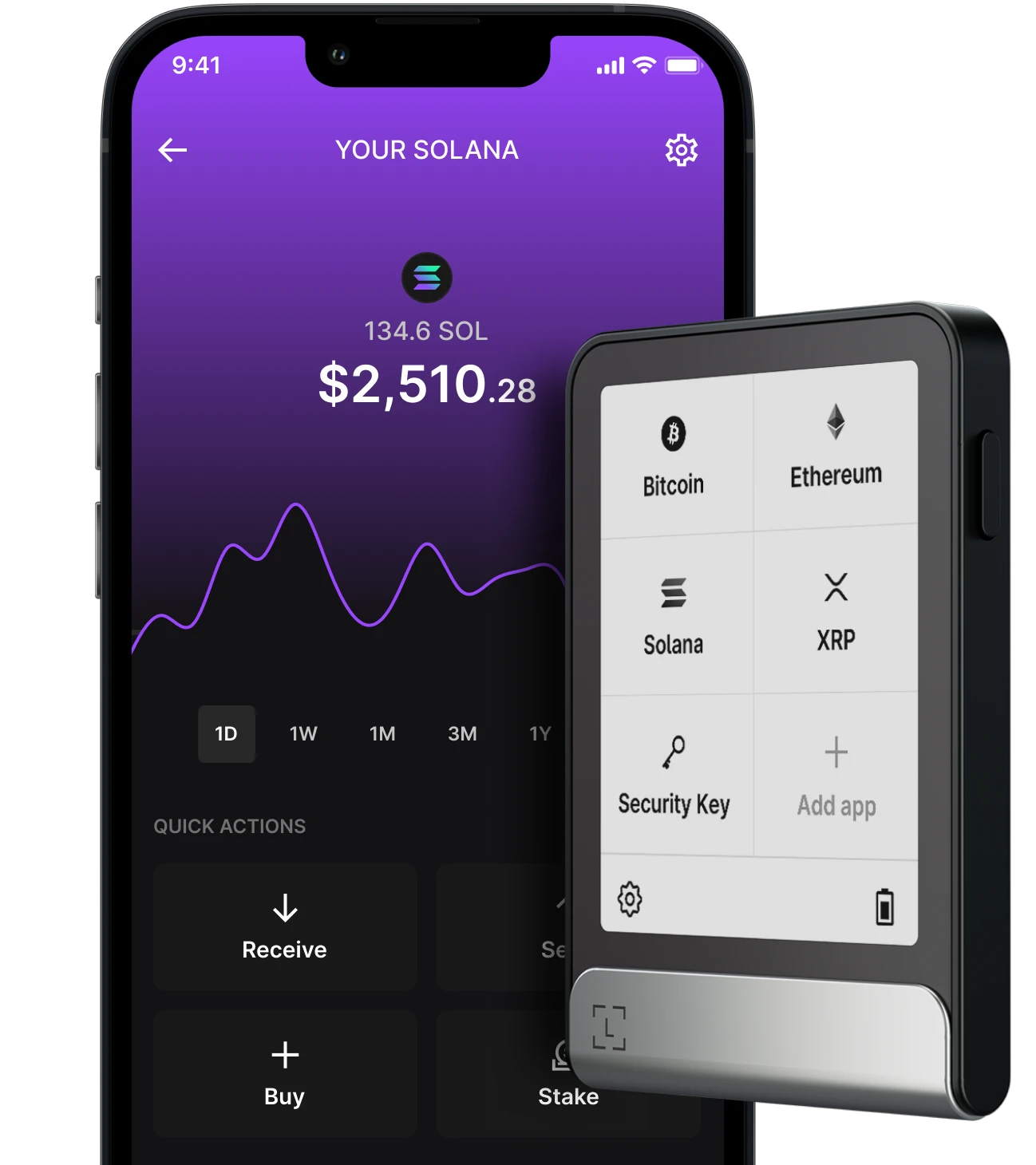
The Ledger Nano X is the hardware wallet of choice for Solana holders who prioritize security above all else. Unlike software wallets that store keys on your phone or computer, the Nano X keeps your private keys isolated on a dedicated secure chip. This means that even if your computer is infected with malware, your Solana assets remain safe because the keys never leave the device.
The device connects to your phone via Bluetooth or to your computer via USB-C, allowing you to manage your Solana holdings through the Ledger Live desktop app or the Ledger Live mobile app. This integration provides a user-friendly interface for viewing balances, sending transactions, and staking SOL without ever exposing your seed phrase to the internet.
For long-term holders or those managing significant value, the physical nature of the Nano X offers peace of mind that software-only solutions cannot match. It serves as a robust first line of defense, ensuring that your crypto remains under your sole control.


As an Amazon Associate, we may earn from qualifying purchases.
Phantom, Solflare, and Ledger: Side-by-Side Comparison
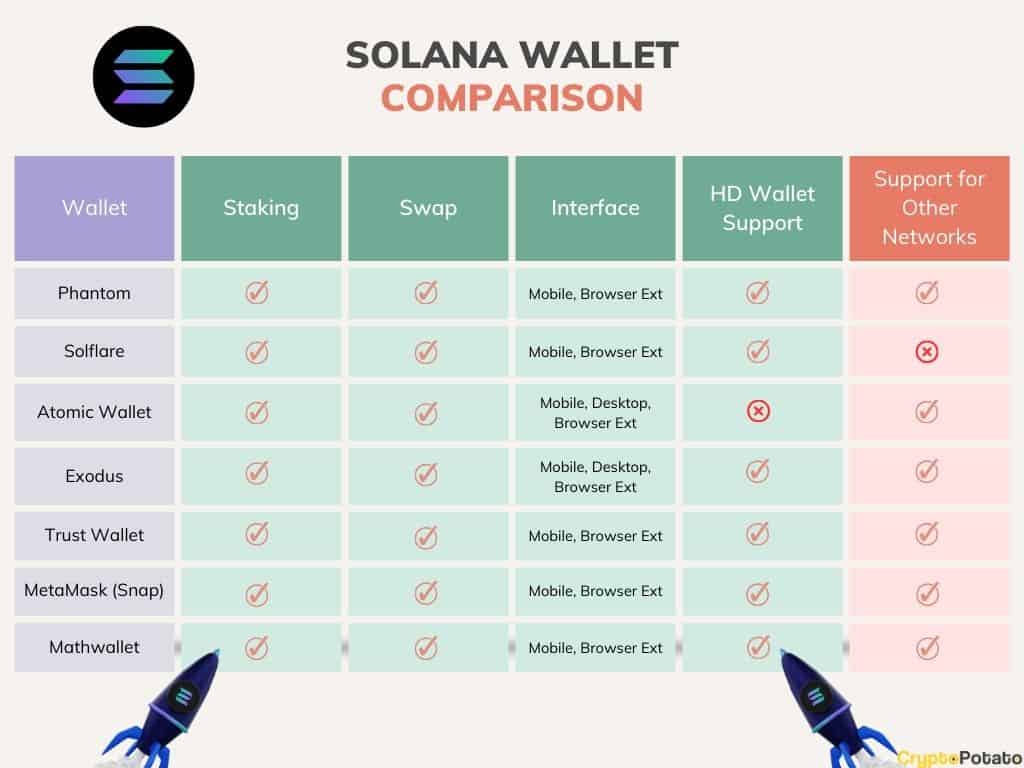
Choosing the right Solana wallet often comes down to your specific workflow. Do you prioritize mobile convenience for daily swaps, or do you need hardware-grade security for long-term holdings? This table breaks down the core differences between Phantom, Solflare, and Ledger so you can pick the tool that matches your needs.
| Platform | Security Type | DeFi & NFT Access | Best For |
|---|---|---|---|
| Mobile & Desktop | Software (Hot) | Full native integration | Daily trading & DeFi |
| Mobile, Desktop & Browser | Software (Hot) | Deep Solana ecosystem support | Power users & staking |
| Hardware Device | Hardware (Cold) | Via connected hot wallet | Long-term storage & security |
Phantom and Solflare are both excellent hot wallets, meaning they connect directly to the internet. They are ideal for active traders who need quick access to DeFi protocols and NFT marketplaces. Phantom is often preferred for its sleek interface, while Solflare offers granular control over transaction fees and account management.
Ledger, on the other hand, is a hardware wallet. It stores your private keys offline, making it immune to online hacking attempts. While it requires a companion app (like Phantom or Solflare) to interact with apps, it is the safest choice for storing significant amounts of SOL or valuable NFTs for the long haul.
How to secure your Solana assets
Securing your Solana holdings is less about complex coding and more about disciplined habits. Your wallet is only as safe as the weakest link in your routine, which usually means your seed phrase or your attention to detail. Treat your digital assets like physical valuables: keep them offline, verify every address, and never share your credentials.
Write your 12 or 24-word recovery phrase on paper or metal. Never store it digitally in screenshots, cloud notes, or email drafts. If your device is compromised, your funds are gone.
Phishing sites often mimic popular dApps with slight URL variations. Always double-check the contract address before interacting with a token. Bookmark the official links from sources like Solana.com and avoid clicking links from emails or social media DMs.
Add two-factor authentication to your email and any exchange accounts linked to your wallet. Use an authenticator app rather than SMS, which is vulnerable to SIM-swapping attacks. This adds a critical layer of defense if your password is leaked.
A security checklist helps ensure you haven't missed a step. Keep this list handy when setting up a new wallet or performing a large transaction.
Common questions about Solana wallets
Choosing the right wallet often comes down to how you plan to use it. Here are the most frequent questions we get about safety, fees, and compatibility.
Is Phantom wallet safe?
Phantom is widely regarded as one of the safest options for Solana, featuring built-in transaction previews that show you exactly what a signature will do before you approve it. It also supports hardware wallet integration, meaning your private keys stay on your Ledger device even while you use Phantom’s interface for daily swaps.
Can I use Ledger with Phantom?
Yes. You can connect a Ledger Nano S Plus or X to Phantom to add an extra layer of security. This setup is ideal for holding larger amounts of SOL or valuable NFTs, as it ensures your keys never leave your physical device. You still use the Phantom app to browse the web, but the Ledger signs the transactions.
Do Solana wallets support NFTs?
Both Phantom and Solflare have robust NFT galleries that let you view, send, and manage your digital assets directly. Phantom’s interface is particularly polished, making it easy to preview artwork before listing it on marketplaces like Magic Eden. Solflare offers similar functionality with a focus on clean, minimalist design.
No comments yet. Be the first to share your thoughts!