
Choose a Solana wallet based on security and age
Your Solana wallet is the first line of defense for your assets. The best choice depends on how much you hold and how often you trade. Hot wallets like Phantom and Solflare offer convenience for daily swaps and NFT management, while cold storage devices like Ledger or Keystone provide offline security for long-term holdings.
When shopping for hardware wallets, condition matters. A used device may look fine but could have hidden firmware tampering. Always buy directly from the manufacturer or an authorized retailer to ensure the seal is intact. For new buyers, a fresh Ledger Nano S Plus or Keystone Pro is a safer bet than a refurbished unit from a third party.
Price is another factor. Hardware wallets typically range from $50 to $150. While it is tempting to buy a cheaper, older model, the cost of a compromised wallet far outweighs the savings. Prioritize devices with active support for the latest Solana updates and security patches.

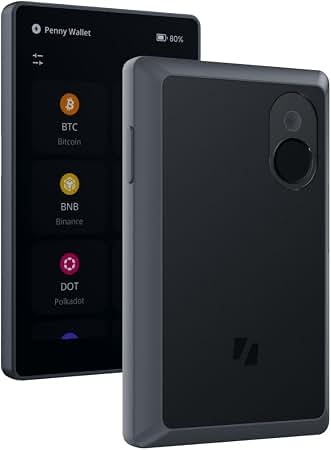
- Air-gapped security
- QR code transactions
- Multi-chain support
As an Amazon Associate, we may earn from qualifying purchases.
The safest approach often involves a combination: use a hot wallet for small, frequent transactions and a cold wallet for your primary savings. This three-wallet system balances accessibility with protection, ensuring your Solana holdings remain secure regardless of market volatility.
Shortlist real options
Choosing a Solana wallet depends on how you plan to use it. The ecosystem offers distinct options for different needs, from daily trading to long-term storage. This section compares the strongest contenders based on available features, security models, and user experience.
Phantom
Phantom remains the most popular choice for general Solana users. It offers a clean interface for managing tokens, NFTs, and interacting with dApps. The wallet supports native staking directly within the app, making it easy to earn yield on SOL. It is available as a browser extension and on mobile devices. Phantom is a solid starting point for beginners and experienced users alike.
Solflare
Solflare is designed for users who want more control over their assets. It features native staking and built-in swap functionality. The wallet supports multiple accounts and offers detailed transaction history. Solflare is often recommended for its robust security features and active development. It is a strong alternative for users who prefer a dedicated Solana-focused interface.
Ledger (Hardware)
For long-term storage, hardware wallets like Ledger provide the highest level of security. They keep private keys offline, protecting them from online threats. Ledger devices support Solana through companion apps like Ledger Live or Phantom. This setup is ideal for holding significant amounts of SOL or valuable NFTs. It adds a layer of physical security that software wallets cannot match.
Comparison of Wallet Options
The table below summarizes the key features of these wallets. Use this to decide which option fits your security and usage requirements.
| Wallet | Type | Native Staking | Security Level |
|---|---|---|---|
| Phantom | Software | Yes | Medium |
| Solflare | Software | Yes | Medium |
| Ledger | Hardware | Via App | High |
Inspect the expensive parts
The Solana Ecosystem works best as a clear sequence: define the constraint, compare the realistic options, test the tradeoff, and choose the path with the fewest hidden costs. That order keeps the advice usable instead of decorative. After each step, pause long enough to check whether the recommendation still fits the reader's actual situation. If it depends on perfect timing, unusual access, or a best-case budget, include a simpler fallback.
Plan for ownership costs
The Solana Ecosystem works best when the purchase path is explicit. Verify the source, compare the offer against real alternatives, check the total cost, and confirm what happens after payment before you decide. After each comparison, write down the one risk that would change your mind. If the seller, condition, support, warranty, shipping, or upkeep still feels uncertain, resolve that question before moving to checkout.
The simplest way to use this section is to verify the seller, compare the total cost, and resolve the biggest risk before you commit.
Solana Wallets FAQs
Choosing the right Solana wallet depends on how you plan to use your assets. Whether you are holding SOL for staking, trading on DeFi platforms, or managing NFTs, the trade-offs between convenience and security vary significantly.
Is Phantom or Solflare better for beginners?
Both wallets are excellent starting points, but they serve slightly different needs. Phantom offers a streamlined interface that is widely considered the standard for general Solana usage, including easy access to NFTs and dApps. Solflare is often preferred for its robust staking features and detailed portfolio tracking. For most new users, Phantom provides the lowest friction entry point.
Can I use a hardware wallet like Ledger with Solana?
Yes, hardware wallets like Ledger (Nano X, Stax, or Flex) and Keystone provide cold storage for Solana assets. This is the safest method for holding significant value, as private keys never leave the device. You connect the hardware wallet to software interfaces like Phantom or Solflare to sign transactions, combining high security with user-friendly interfaces.
Is it safe to store large amounts of SOL in a software wallet?
Software wallets are convenient for daily transactions but are vulnerable to phishing and malware. For long-term storage or large holdings, a hardware wallet is strongly recommended. A common security practice is to use a three-wallet system: a hardware wallet for savings, a secure software wallet for active trading, and a separate wallet for interacting with untrusted websites or new dApps.
Do Solana wallets support staking directly?
Yes, most major Solana wallets like Phantom and Solflare support native staking. This allows you to earn rewards on your SOL holdings without moving your assets to an exchange. You can delegate your stake directly from the wallet interface to a validator, simplifying the process and keeping your keys under your control.
No comments yet. Be the first to share your thoughts!