
Solana Wallets: Balancing Budget, Age, and Condition
Choosing a Solana wallet isn't just about software; it's about the physical hardware that protects your keys. For cold storage, the market is split between established giants like Ledger and Trezor, and newer, security-focused options like Keystone. Your budget will likely land between $70 and $150, but the condition of the device matters just as much as the price.
When buying hardware wallets, avoid used units from third-party sellers. A refurbished Ledger Nano X might save you $30, but you cannot verify if the device has been tampered with or if the seed phrase was exposed during previous use. New, sealed units from official retailers are the only safe bet for high-stakes assets.
For budget-conscious users, the Ledger Nano S Plus offers a compelling entry point. It supports Solana and major DeFi protocols at a lower price point than the X model. If you prioritize air-gapped security over Bluetooth convenience, the Keystone Pro is a strong alternative, though it requires a slightly steeper learning curve.


As an Amazon Associate, we may earn from qualifying purchases.
The tradeoff is clear: you pay for verified authenticity and fresh firmware. Buying from unofficial Amazon sellers or eBay introduces risk that outweighs the savings. Stick to authorized resellers to ensure your Solana keys remain secure.
Shortlist real options
Choosing the right Solana wallet depends on whether you prioritize ease of use for daily DeFi interactions or the security of cold storage. The landscape is split between hot wallets, which connect directly to dApps, and hardware devices that keep private keys offline.
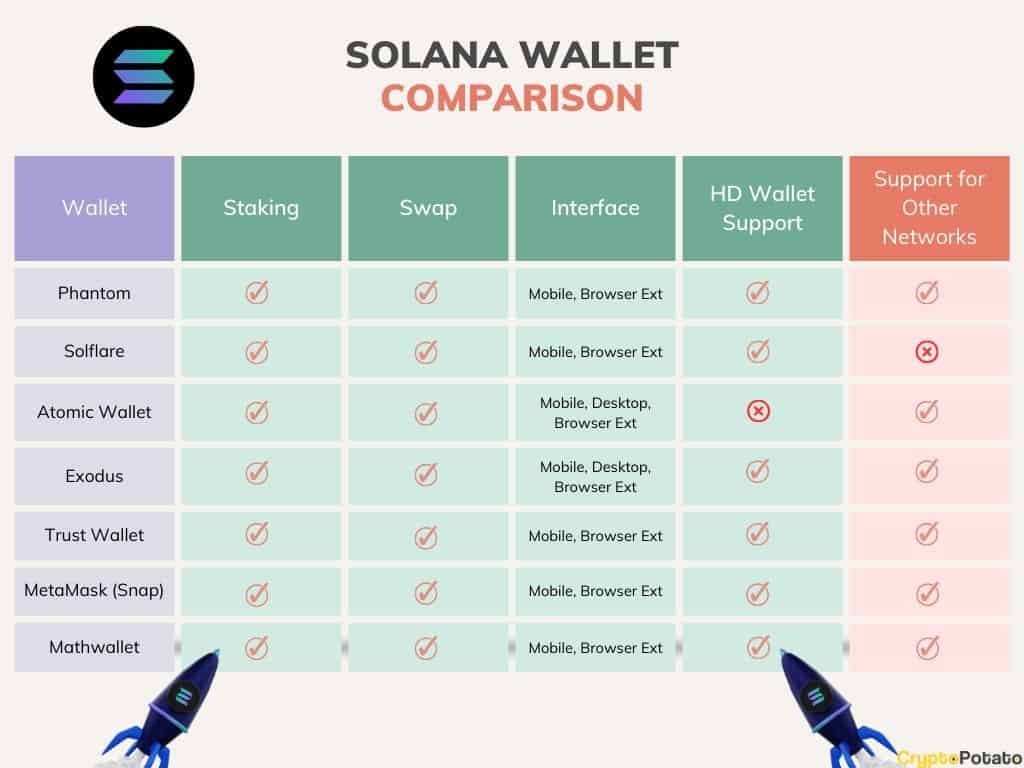
Phantom remains the dominant choice for most users due to its intuitive interface and broad support for Solana-based NFTs and tokens. Solflare offers a strong alternative, particularly for users who want native staking features built directly into the mobile and desktop apps. For those holding significant value, Ledger and Keystone provide the necessary hardware security.
The table below compares the primary hot wallet options available for 2026, focusing on platform availability, security model, and key features. This comparison helps you decide which interface aligns with your trading and staking habits.
| Wallet | Platforms | Security Model | Best For |
|---|---|---|---|
| Phantom | Web, Mobile, Desktop | Non-custodial (Software) | Daily trading and NFTs |
| Solflare | Web, Mobile, Desktop | Non-custodial (Software) | Native staking and swaps |
| Backpack | Web, Mobile, Desktop | Non-custodial (Software) | Web3 experimentation |
| Ledger | Hardware Device | Hardware (Cold Storage) | Long-term holding |
| Keystone | Hardware Device | Hardware (Air-gapped) | Maximum security |
When evaluating these options, consider how often you interact with Solana dApps. Phantom and Solflare provide seamless browser extensions for seamless transaction signing, while hardware wallets require a physical button press for every action. This trade-off between convenience and security is the primary factor in selecting your primary Solana wallet.
Inspect the expensive parts
When choosing a Solana wallet, the cost of a mistake is measured in lost tokens, not just time. A single phishing link or a misconfigured transaction can drain an account permanently. This section breaks down the specific failure points that matter most, moving from hardware security to daily transaction habits.
Not all hardware wallets support Solana natively. Ledger and Keystone are the primary options, but you must verify that the device’s firmware and the companion software (like Ledger Live or Solflare Desktop) have active Solana support. If a wallet claims support but requires a third-party bridge, the security risk increases significantly. Check the official Solana wallet directory to confirm compatibility before purchasing.
Most Solana hacks happen through phishing, not broken cryptography. Look for wallets that display clear, human-readable transaction details before you sign. Phantom and Solflare both offer detailed breakdowns of token transfers and smart contract interactions. Avoid wallets that only show a cryptic hash or a simple "Approve" button. A good interface should make it difficult to sign a malicious transaction by mistake.
Staking rewards are attractive, but delegating to a validator introduces risk. If you delegate to a malicious or poorly managed validator, you could face slashing penalties or loss of funds. Always check the validator’s historical performance and security audits. Some wallets allow you to switch validators instantly, which is a crucial feature for managing risk. Never stake with a validator you haven’t researched independently.
Before moving significant assets, send a small amount to test the wallet’s sending and receiving functions. Verify that the address generation is correct and that you can recover the wallet using your seed phrase. This step confirms that the backup process works as expected. If you encounter any issues during this test, do not proceed with larger transfers until the problem is resolved.
| Feature | Phantom | Solflare | Ledger |
|---|---|---|---|
| Native Solana Support | Yes | Yes | Yes |
| Hardware Integration | Yes | Yes | Yes |
| Staking Interface | Built-in | Built-in | Via App |
| NFT Management | Advanced | Basic | None |


As an Amazon Associate, we may earn from qualifying purchases.
Plan for ownership costs
A wallet’s sticker price rarely reflects the total cost of keeping your Solana assets safe. The real expense comes from the hidden fees, hardware replacements, and security habits required to prevent loss. A cheap software wallet becomes expensive if you lose funds to a phishing site, and a $50 hardware wallet is a waste if you forget the recovery phrase.
Hardware replacement and backup costs
Hardware wallets like Ledger or Keystone are not one-time purchases; they are long-term investments that require maintenance. If you lose your device, you must buy a replacement. More importantly, the physical recovery seed card is your only lifeline. Paper degrades, and digital photos of seeds are security risks. Budget for a metal backup solution to protect against fire or water damage.
Network fees and transaction costs
Even on Solana, where fees are fractions of a cent, activity adds up. Swapping tokens, bridging assets, or interacting with DeFi platforms incurs transaction fees. While negligible for small trades, frequent traders or NFT collectors can see these costs accumulate. Additionally, staking rewards are often gross returns; network inflation and validator fees can erode the net yield, so always calculate costs after the fee is deducted.
When a cheap buy stops being cheap
Free software wallets are excellent for small, daily transactions but risky for large holdings. If you hold significant SOL, the cost of a hardware wallet is justified by the protection it offers against malware and phishing. The "cheap" option is only affordable if you have the technical expertise to secure your keys yourself. For most users, the peace of mind of a dedicated cold storage device is worth the upfront cost.


As an Amazon Associate, we may earn from qualifying purchases.
Solana wallet: what to check next
Choosing the right Solana wallet often comes down to balancing ease of use with security. Most users start with a hot wallet like Phantom or Solflare for daily transactions, then move to cold storage for larger holdings.
No comments yet. Be the first to share your thoughts!