
How we picked the best Solana wallets
We evaluated Solana wallets against three core criteria: security architecture, user experience, and DeFi compatibility. Our goal was to identify tools that keep assets safe while providing a smooth interface for managing tokens and interacting with decentralized applications.
To ensure accuracy, we prioritized official documentation and verified security audits over user reviews or marketing claims. We reviewed the technical specifications of Phantom, Solflare, and Ledger, focusing on how each handles private key storage and transaction signing. We also consulted expert consensus from the Solana ecosystem to verify real-world performance and reliability.
This approach allows us to recommend specific products with confidence. You will find concrete comparisons of these wallets in the sections below, highlighting their distinct strengths for different types of users.
Phantom: Best for daily DeFi use
Phantom has established itself as the default entry point for active Solana users, prioritizing a clean interface that makes complex blockchain interactions feel straightforward. The wallet’s design philosophy centers on accessibility without sacrificing the depth required for serious DeFi participation. Its intuitive layout allows users to quickly navigate between tokens, NFTs, and decentralized applications, reducing the friction often associated with crypto management.
The platform’s strongest asset is its deep integration with the Solana ecosystem. Phantom offers quick access to a vast array of dApps, from lending protocols to decentralized exchanges, allowing users to swap tokens or provide liquidity directly within the interface. This seamless connectivity means you rarely need to leave the app to execute transactions, streamlining the workflow for daily trading and portfolio management.
Security remains a priority even in a hot wallet environment. Phantom employs industry-standard encryption for private keys and offers built-in phishing detection to warn users about malicious sites. For those who trade frequently, this balance of user-friendly design and robust security features makes it a reliable tool for managing SOL and SPL tokens.

For users who want to extend their security beyond the browser, Phantom also supports hardware wallet integration. This allows you to sign transactions securely using devices like Ledger or Trezor, combining the convenience of Phantom’s UI with the offline protection of cold storage. This hybrid approach is ideal for holding significant assets while still enjoying the ease of daily use.
Solflare: Best for Staking Rewards
Solflare positions itself as a self-custody wallet with a heavy emphasis on security and native staking utility. Unlike platforms that bury staking options behind complex menus or require third-party bridges, Solflare integrates the process directly into the main interface. This makes it a strong candidate for users who want to earn yield on their SOL holdings without sacrificing control of their private keys.
The wallet allows you to stake SOL directly from your dashboard. You can choose to delegate to validators or use Solflare’s recommended list, which is designed to balance reliability with competitive rewards. Once you initiate a stake, the process is straightforward: select your validator, confirm the transaction, and your assets begin working for you. There are no lock-up periods for your principal, meaning you can unstake at any time, though rewards may take a few epochs to process after you decide to withdraw.
Security is another pillar of Solflare’s design. It is an open-source project, meaning its code is publicly auditable, which adds a layer of transparency often missing in proprietary software. The wallet also supports hardware integration, allowing you to sign transactions securely using devices like Ledger. This combination of open-source verification and hardware support provides a robust defense against online threats, which is essential for anyone holding significant assets.
While Solflare may not have the most polished NFT marketplace experience compared to competitors, its focus on foundational utility makes it a reliable tool for long-term holders. If your primary goal is to accumulate passive income through staking while maintaining strict custody over your assets, Solflare offers a balanced, secure, and efficient solution.
Ledger Nano X: Best for Cold Storage
The Ledger Nano X is the standard for secure Solana storage, designed specifically for long-term holders who prioritize security over daily convenience. By keeping your private keys offline on a dedicated hardware device, it creates a formidable barrier against online threats like phishing, malware, and exchange hacks. This "cold storage" approach ensures that even if your computer or phone is compromised, your Solana assets remain untouched and safe from remote attackers.
The device is Bluetooth-enabled, allowing you to manage your Solana tokens directly from your mobile device using the Ledger Live app. This wireless connectivity removes the friction of plugging in a USB cable for every transaction, making it practical for users who value both security and portability. The built-in battery supports weeks of use on a single charge, and the compact form factor fits easily into a pocket or wallet.
To use the Nano X with Solana, you must install the official Solana application from the Ledger Live manager. Once installed, the device handles all signing requests internally, displaying transaction details on its small screen for final verification before you approve them. This offline verification process is critical; it prevents any malicious software on your host device from altering the destination address or amount during a transfer.
While the Ledger Nano X requires an initial investment, the cost is negligible compared to the value of the security it provides. It is not designed for high-frequency trading or quick swaps; instead, it serves as a digital vault for your significant holdings. For the best protection, many experts recommend pairing the hardware wallet with a software wallet like Phantom for smaller, everyday transactions.


As an Amazon Associate, we may earn from qualifying purchases.
Phantom, Solflare, and Ledger Compared
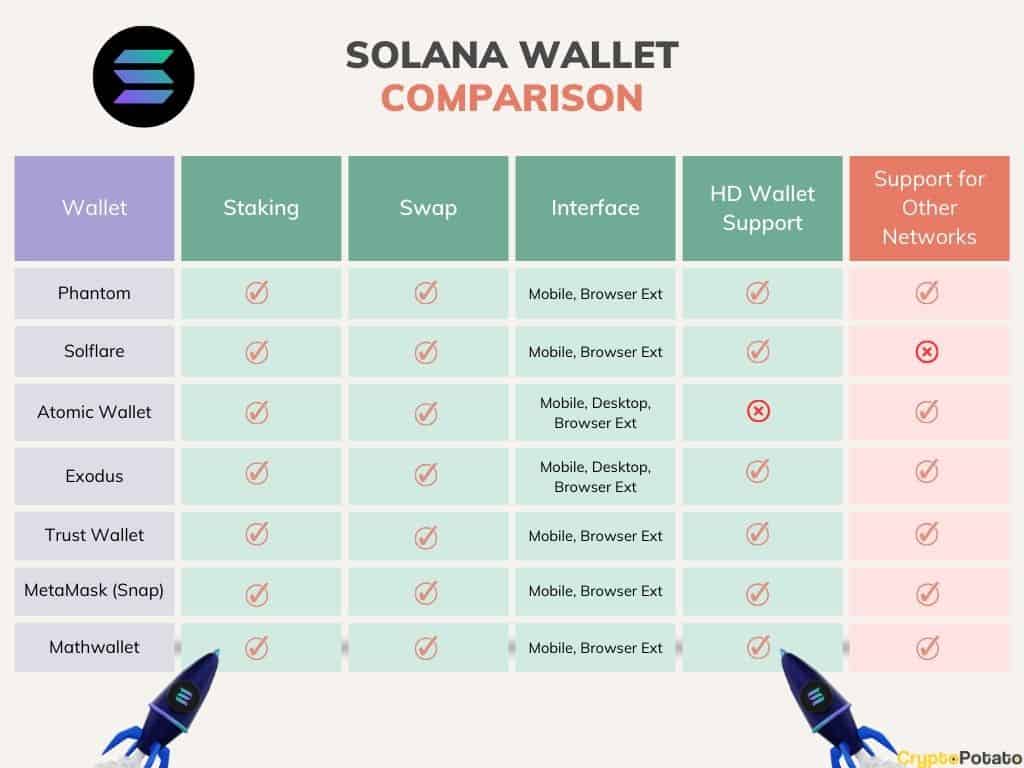
Choosing the right Solana wallet depends on whether you prioritize ease of use, advanced features, or hardware security. The following comparison highlights the primary strengths of the three most prominent options: Phantom, Solflare, and Ledger.
| Wallet | Security Type | Platform | Best Use Case |
|---|---|---|---|
| Phantom | Hot Wallet | Mobile, Desktop, Browser | Daily trading and DeFi |
| Solflare | Hot Wallet | Mobile, Desktop, Browser | Staking rewards |
| Ledger | Hardware Wallet | Desktop, Mobile (via Bluetooth) | Long-term storage |
Phantom offers the most intuitive interface for interacting with Solana dApps and NFTs, making it the default choice for active users. Solflare provides robust staking tools and transparent reward tracking, appealing to those focused on yield. Ledger keeps your private keys offline, serving as the safest option for holding significant assets long-term.
For those managing substantial holdings, combining a hot wallet for daily transactions with a hardware wallet for storage is the standard security practice. Phantom and Solflare both support Ledger integration, allowing you to sign transactions securely while enjoying their user-friendly interfaces.
Setting up your Solana wallet safely
Securing your Solana wallet requires strict adherence to security protocols from the moment of installation. The difference between a functional wallet and a compromised one often comes down to how you handle your private keys and verify the software source.
Only install Phantom or Solflare from their official websites or verified app stores. Avoid third-party links or browser extensions from unknown publishers, as these may contain malware designed to steal your credentials.
Your 12- or 24-word seed phrase is the master key to your assets. Write it down by hand on paper or metal and store it in a secure physical location. Never store it digitally, take a screenshot, or save it in a password manager.
Always double-check the first and last characters of your receiving address before sending funds. Malicious QR codes or clipboard hijackers can alter destination addresses, so verifying the full string prevents irreversible loss.
Common questions about Solana wallets
Users frequently ask which Solana wallet is best for their needs. The answer depends on whether you prioritize daily usability or hardware security. Phantom and Solflare are the two most popular software options, each offering a smooth UI for accessing tokens, NFTs, and dApps.
Is Phantom or Solflare better?
Phantom is often preferred for daily use because of its broad dApp integration and speed. Solflare is a strong alternative that offers similar functionality with a slightly different interface. Both are solid choices for managing Solana assets, so the decision usually comes down to personal preference for the user experience.
Which Solana wallets are beginner friendly?
Phantom and Solflare are both considered beginner-friendly due to their intuitive designs. They simplify complex crypto tasks like swapping tokens and bridging assets. If you are new to Solana, starting with either of these two wallets will provide a straightforward entry point into the ecosystem.
Is Solflare wallet safe?
Solflare is a reputable software wallet that uses standard security measures to protect user funds. It is open-source, allowing the community to audit its code. However, for maximum security, many users eventually move their largest holdings to a hardware wallet like Ledger, which keeps private keys offline and isolated from internet threats.
No comments yet. Be the first to share your thoughts!