
How we picked the best Solana wallets
We evaluated Phantom, Solflare, and Ledger against strict criteria to help you choose a wallet that balances ease of use with serious security. Because Solana involves high-stakes self-custody, we prioritized wallets with verified official integrations on solana.com/wallets and transparent security audits.
Our selection process focused on three pillars:
- Official Integration: We checked if the wallet is listed on Solana’s official directory. This ensures the software meets the network’s technical standards for transaction signing and node compatibility.
- Security Audits: We reviewed public audit reports for software wallets like Phantom and Solflare. For hardware options like Ledger, we verified support for the Solana app and secure element architecture.
- User Experience: We tested the interfaces for clarity, especially for beginners managing NFTs and tokens. We looked for intuitive navigation and clear fee estimates.
Before choosing, ask yourself if you need the convenience of a browser extension or the cold-storage security of a hardware device. Phantom and Solflare excel in daily trading, while Ledger offers peace of mind for long-term holders. Always verify the wallet’s URL and download source directly from the official Solana directory to avoid phishing sites.
Phantom: Best for daily DeFi and NFTs
Phantom has become the default entry point for new Solana users, largely because it handles the complexity of the ecosystem without requiring a degree in blockchain engineering. It functions as a comprehensive hub rather than just a storage container. The interface prioritizes speed and clarity, making it easy to swap tokens, bridge assets, and view NFT collections in a single, unified dashboard.
The wallet’s strongest feature is its deep integration with Solana’s decentralized applications (dApps). Instead of copying and pasting addresses or switching between multiple browser extensions, Phantom allows you to connect to DeFi platforms and NFT marketplaces with a single click. This seamless connection reduces the friction of onboarding and keeps your workflow inside one trusted environment.
For users looking to grow their holdings, Phantom includes built-in staking capabilities. You can delegate your SOL directly from the app to earn rewards without leaving the interface. While staking is straightforward, Phantom also provides transparent data on validator performance, allowing you to choose operators that align with your risk tolerance and yield expectations.
Security remains a top priority for non-custodial wallets like Phantom. Your private keys are stored locally on your device, meaning only you have access to your funds. However, this self-custody model requires responsibility. If you lose your recovery phrase, your assets are unrecoverable. For long-term storage, consider pairing Phantom with a hardware wallet like Ledger, which adds an extra layer of physical security for larger holdings.
If you are looking for accessories to secure your setup or manage your crypto journey, consider exploring official Phantom merchandise or starter kits available on Amazon.

Solflare: Best for advanced staking controls
Solflare stands out as the go-to choice for Solana users who want granular control over their staking rewards. Unlike wallets that automate the process in the background, Solflare gives you the dashboard to manage validator selection, delegation, and reward distribution with precision. It is an open-source interface that prioritizes transparency, allowing you to see exactly where your SOL is working for you.
The wallet’s strength lies in its ability to handle complex staking scenarios without requiring technical expertise. You can choose specific validators based on performance history or commission rates, and the interface makes it easy to switch between them. This level of control is particularly valuable for those who view staking as an active part of their portfolio strategy rather than a set-and-forget task.
Security remains a top priority, with Solflare supporting hardware wallet integration for cold storage. This means you can enjoy the advanced staking features while keeping your private keys offline. For users who value both power and security, Solflare offers a balanced environment that respects your autonomy over your digital assets.
Ledger Nano X: Best for cold storage security
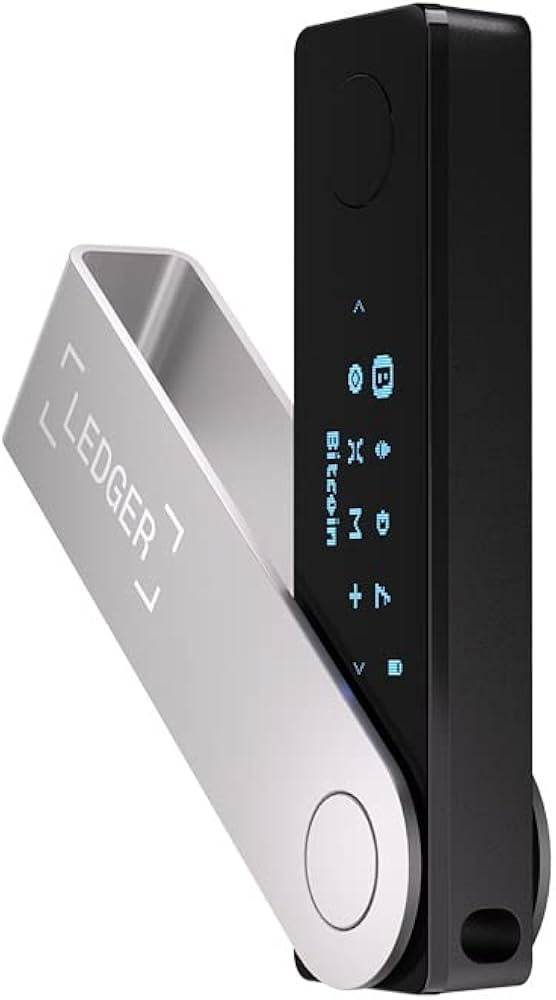
When your Solana holdings grow beyond casual amounts, keeping them on a computer or phone leaves them exposed to malware and phishing attacks. The Ledger Nano X solves this by storing your private keys on a dedicated hardware device. This means your keys never touch the internet, effectively isolating them from digital threats.
Think of the Nano X as a digital vault. You keep the keys in a safe place, and only access the vault when you need to sign a transaction. Even if your computer is infected with a virus, the malware cannot steal your coins because it cannot access the secure chip inside the device. This level of security is essential for long-term holders who prioritize safety over convenience.
The Nano X connects via Bluetooth, allowing you to manage your Solana assets from your phone or computer. It pairs with software wallets like Phantom or Solflare, which handle the user interface while the Ledger device handles the critical signing process. This hybrid approach gives you the ease of use of a software wallet with the ironclad security of hardware storage.
For those who need maximum protection, the Ledger Nano X is the standard. It supports Solana natively through the Ledger Live application, ensuring that your assets are managed securely without compromising on functionality.

As an Amazon Associate, we may earn from qualifying purchases.
Phantom, Solflare, and Ledger at a glance
Choosing the right Solana wallet depends on how you plan to use your assets. Are you trading NFTs daily, staking for yields, or holding long-term? The three leading options—Phantom, Solflare, and Ledger—serve different needs.
Phantom offers the smoothest interface for daily use, making it ideal for beginners who want quick access to dApps and tokens. Solflare provides robust staking tools and strong security features for those who prioritize yield generation. Ledger, a hardware wallet, offers the highest level of security for long-term holders by keeping private keys offline.
Use the comparison below to see how they stack up on key features like custody type, staking support, and NFT capabilities.
Frequently asked questions about Solana wallets
Which wallet is best for beginners?
Phantom is widely considered the best starting point for new Solana users. It offers the most intuitive interface for managing tokens, NFTs, and basic DeFi interactions. Its design minimizes technical friction, making it easier to learn the ecosystem without feeling overwhelmed by advanced settings.
Is Phantom wallet safe for Solana?
Phantom is a reputable self-custody wallet, meaning you control your private keys. However, "safe" depends on your habits. Always verify the official website to avoid phishing clones. Never share your 12-word recovery phrase with anyone, including support staff. Phantom does not store your keys on their servers, so if you lose your phrase, your funds are unrecoverable. For large holdings, consider importing your Phantom keys into a Ledger hardware wallet for an extra layer of protection.
Can I use a hardware wallet with Solana?
Yes. Ledger Nano S Plus and Ledger Nano X both support Solana. You can use them with the Solana app installed on the device, then connect to Phantom or Solflare software interfaces. This keeps your private keys offline while allowing you to interact with dApps. This hybrid approach is recommended for high-stakes users who want the ease of software wallets with the security of cold storage.
What are the fees for sending Solana transactions?
Solana is known for low transaction fees, typically a fraction of a cent. However, network congestion can occasionally cause brief spikes. Phantom and Solflare both display estimated fees before you confirm a transaction. Unlike Ethereum, Solana does not use a gas auction system, so fees remain predictable for most users. Always check the current fee estimate in your wallet before initiating large transfers.
How do I recover my Solana wallet if I lose access?
Recovery relies entirely on your 12-word or 24-word seed phrase. Write it down on paper and store it in a secure, fireproof location. Digital copies (screenshots, cloud notes) are vulnerable to hackers. If you use a Ledger device, you can recover your wallet by entering the seed phrase on a new device. If you lose both your device and your seed phrase, there is no way to recover your funds.
No comments yet. Be the first to share your thoughts!